
Abhi
19-12-05
Global Recruiter / Partner
Website
ADMIN_TOOL
Enclosed find write-ups / U-I for
- Employer (subscriber) Admin pages
- Jobseeker ”
Before 2 have today, I will try
to ready
- Partner website Admin Pages
- Global Recruiter ”
P.S.
You may wish to add, on all
displays drop lists of Year Month .
All tabulations must be capable
of being Viewed (blank) by ANYBODY – Any Visitors. This is very very important.
Only when a person fills in User ID/Password, his data will fill-up the blank
tables.
JobSeekers
My History
Job Search History
Apply Online History
Jobseeker Services
Post Resume (Register)
My Job Preferences
Job Search
Resume Blast
Resume-Courier
Home
Contact Us
My History
Dear Jobseeker
From your first job (after
graduation) till you retire, you can track your entire “Career Progression”
on this website, at one place. Obviously, it would be highly unproductive and
time-consuming to store bits-and-pieces of your career-growth on several
websites.
When you register here and start
using this website, you can review,
your
Job Search History
Apply Online History
This is just the beginning. In
due course, you will also get to review your
Resume Blast History
Resume-Courier History
Job Alert Mobile (JAM/JAB)
History
Resume Edit History
You may login here or on
respective History pages
My History
Job Search History
Apply Online History
Dear Jobseeker
This is the only website,
where you can expect to receive from the job-advertisers, some
feedback/ acknowledgement. If they don't, their Advertiser
Responsiveness Monitor (ARM) Score will go down and the whole world will
know! And if you have not received any feedback, click on "Job
Code" and email your inquiry to concerned Advertiser (eg: I applied on
- - - - and I am still awaiting your feedback).
Job Search History
|
Sr. No. |
Search Date |
Job/Adts Viewed |
Jobs Applied |
Apply Online History
|
Sr. No. |
Job Code |
Job Title |
Employer |
Date Applied |
Feedback Date |
Employers
Employer Services
New Employer? Register
Post A Job
Resume Search
Terms
Tariff.
ARM Yourself!
Contact Us
My History
Dear Corporate Subscriber:
Whether you are the ultimate
employer or a placement agency, as a subscriber of this Website, you would want
to know:
What job-advts have I posted on
this website and when?
How many times was each job-advt
opened/viewed?
Who/How many applied online
against each of these jobs?
How many resume-searches did I
conduct?
How many - and whose - resumes
did I download against each search?
Do you want us to maintain any
other statistics? Adding of what other features will make your task easy? Do
Write.
You may login here or on
respective History-page.
My History
Job Advt. Posting History
Resume Search History
My History
Job Advt Posting History
Resume Search History
Dear Subscriber
JOB ADVT. HISTORY.
As shown below, Your Job Advt.
Posting History, is shown in two tabulated displays, viz: SUMMARY &
DETAILS.
To view the DETAILS, simply click
on the “Job Code” in SUMMARY.
In Table 2 (DETAILS), you can
click on a candidate’s name, to see his full resume.
You may rate the resume (A =
Excellent / B = Good / C = Fair / R = Reject) and your rating will show-up on
the SUMMARY tabulation.
Table 1 Job Advt. Summary
|
Sr. No. |
Job Code |
Posting Date |
Job Title |
|
Table 2 Job Advt. Details
|
Job Code |
Job Title |
Times Viewed/Online |
Apply Online |
|
DETAILS
|
Sr. No. |
Candidate Name |
City |
Salary |
Rating |
My History
Job Advt Posting History
Resume Search History
Dear Subscriber
RESUME SEARCH HISTORY
This is organised as follows:
Table 3 – Resume Download
Summary. Click on “Search NO.” will reveal
Table 4 – Resume Download Details
/ clicking on “Candidate Name” will show
full resume. Once you rate any
resume, rating will appear in Table 4.
TABLE # 3 / RESUME DOWNLOAD
SUMMARY.
|
Search NO. |
Search Date |
Search Criteria Used |
Resumes Downloaded |
Name of folder in which
Resumes are stored |
|
Industry |
Function |
Designation Level |
||
|
1. |
||||
|
2. |
||||
|
3. |
TABLE # 4 / RESUME DOWNLOAD
DETAILS.
|
Search No: |
Search Date: |
Resumes Downloaded: |
|
Search Criteria Used |
Designation Level. |
|
|
Industry |
Function |
|
|
1 |
1 |
1 |
|
2 |
2 |
|
|
3 |
|
PEN |
Candidate Name |
Current Details |
Rating |
|
Employer |
Designation |
||
My History
Job Advt Posting History
Resume Search History
Amazon-type
“Recommendation” System
For Job-seekers
To recommend to jobseeker, what
“search criteria” to select, during his next “job-search”.
For Corporates
To recommend to HR mgr. what
“search criteria” to select, during his next “resume-search”.
This is fairly simple.
Let us first take Jobseeker’s
case.
We have already decided to enable
him to view his own
Job Search History
Apply Online History
For conducting a job search, he
has to select, “Ind / Func / Desig level / City”.
When he applies online, he is
applying against a specific Job Advt.
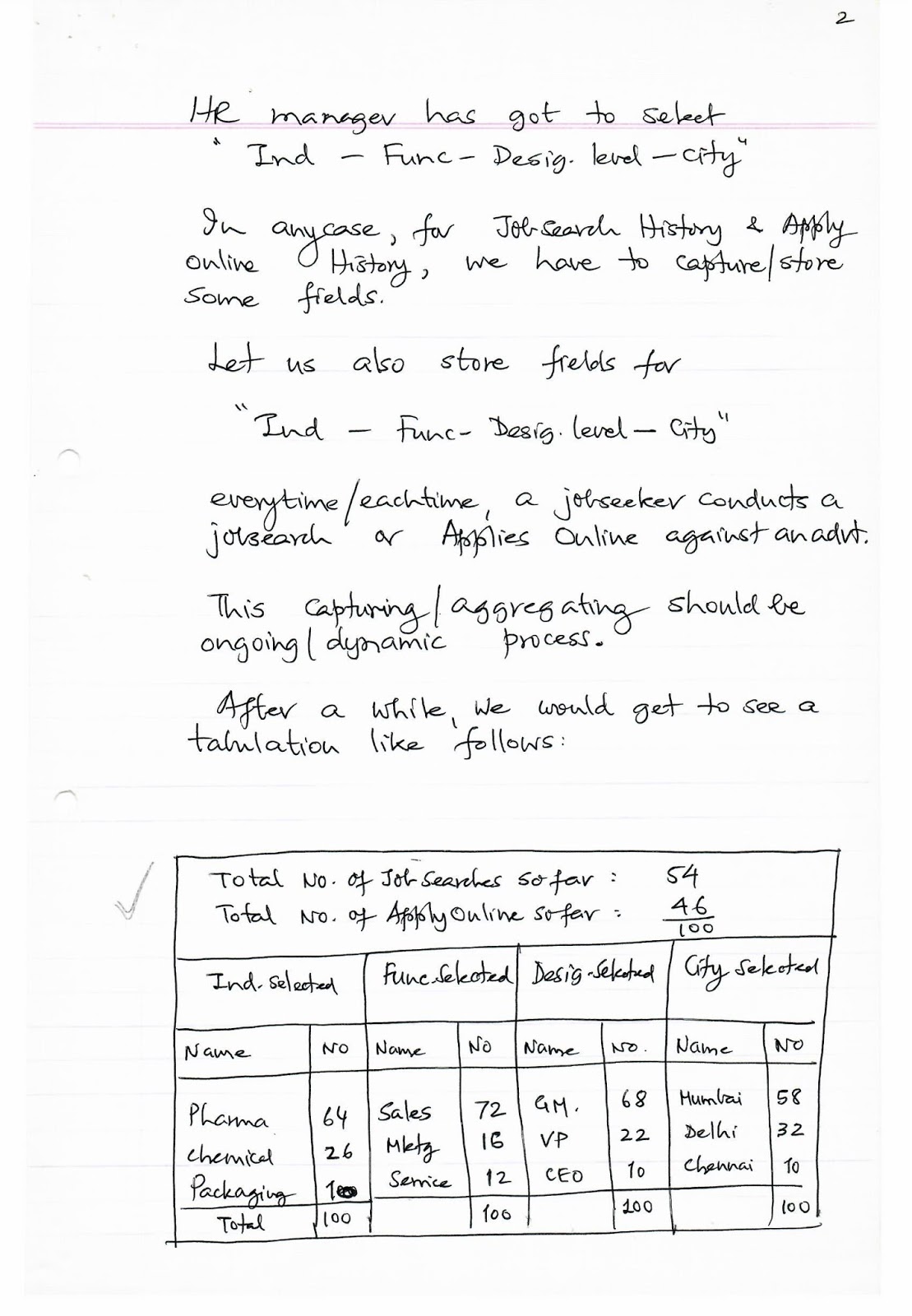
Once again, while posting a job,
a
HR manager has got to select
“Ind – Func – Desig. level –
City”
In any case, for Job-Search
History & Apply Online History, we have to capture/store some
fields.
Let us also store fields for
“Ind – Func – Desig. level –
City”
everytime/eachtime, a jobseeker
conducts a job search or Applies Online against an advt.
This capturing / aggregating
should be ongoing / dynamic process.
After a while, we would get to
see a tabulation like follows:
|
Total No. of Job Searches
so far: |
54 |
|
|
Total No. of Apply Online so
far: |
\frac{46}{100} |
|
Ind. Selected |
Func. Selected |
Desig. Selected |
City Selected |
|
|
Name |
No |
Name |
No |
Name |
|
Pharma |
64 |
Sales |
72 |
GM. |
|
Chemical |
26 |
Mktg |
16 |
VP |
|
Packaging |
10 |
Service |
12 |
CEO |
|
Total |
100 |
100 |
This tabulation is strictly for
our own Viewing (not even by partner websites). In fact, even we would
not want to see it!
But, now we KNOW the probabilities
with which, he is likely to select
during his next job-search.
As soon as he logs in for “Job-Search,”
the search-box will get CUSTOMIZED & get displayed, as
follows:
Dear Ajay, your past
search history suggests your preference for search criteria, shown below. Of
course, feel free to modify
JOB SEARCH
|
Keywords |
|
|
Min Exp |
|
|
Industry |
|
|
Function |
|
|
Desig. level |
|
|
City |
|
For the jobseeker concerned, this
will appear amazing! This is "personalization/customization"
at best.
Now the jobseeker knows WE
CARE, we are here to make his life easy.
This is exactly what Amazon
does – and it is NOT rocket-science!
It is a good thing for us that,
as of now, no other job site does this.
If we do this, it will set us
apart, differentiate us. And unless we differentiate, we cannot attract
(would-be) partners.
They (would-be partners) need
such features to divert jobseekers & Corporates from Monster / Naukri.
We can, similarly, “Recommend”
Ind / Func / Desig. level / cities etc. to a HR manager based on his
past “Resume Search History”.
In Resume Search U/I, as
soon as HR mgr logs-in, we can fill-in (\& really re-arrange the droplists,
with most-searched names at the top) the relevant droplists.
This can be Outsourced to
same person who will develop various ADMIN screens / softwares /
displays.
We can also accumulate /
aggregate “Keywords” used by jobseekers during their job searches \&
calculate “frequency of usage” \& then display those (with high
frequency) in their
“Keyword Box”
When they next log in.
Similarly, when a jobseeker
conducts his first-ever (very first) job search, as soon as he logs-in,
we can
Fill-in his job-preferences
(Ind / Func / Desig. level \& City) into the respective job
search fields. This is quite easy and our “recommendation-system” starts
from his very first job search!
Rahul 12/04/06
ADMIN TOOL
Jobseeker’s Dashboard
In this dashboard, one of the
links should be Function Profile History.
After log-in, clicking on this
link will reveal a tabulated history as follows.
Select
Your Functional profile as on
last day of Month
(For Primary Profile Only)
|
Month |
Raw Score |
Population of Executives
belonging to same FUNCTION |
Percentile Score |
|
Jan |
|||
|
Feb |
These values, as of last date of
each month to be stored \& displayed. Of course, Raw Score No. will
change only if-and-when, that job seeker edits his resume.
But Percentile-Score will
keep changing all the time as more \& more jobseekers
(belonging to same PRIMARY FUNCTION) submit their resumes. Some day
later, we will enable the jobseeker to see a graph as follows:
Abhi / Vikram / Rahul 13-01-06
ADMIN TOOL/DASHBOARD
Admin U/I are to be constructed
for
Partner Websites
Corporates
Ourselves
Job-seeker
In that order. My folder contains
“draft” U/I.
The top priority is for Would-be
Partners.
Next is for Corporates.
Unless these U/I are ready \&
installed, we cannot even launch Global Recruiter!
But not all U/I for partners \&
employers are equally important.
But without the following
screens, we cannot even launch GR:
Partners’ Screens
- List of Employer/Subscribers registered (Reverse
chronology)
- What “Prepaid” payment have each made? Amount
/ Date / Cheque No.
3. When cheque gets
“credited/realised” in partner’s bank a/c, a facility for him to reset the
“counter” (of clicks) and advise concerned Subscriber (by auto. email) to
log-in and see for himself that the “counter” has been “reset” for the amount
sent.
- “Passbook / Account Status” which, shows him, at
any time, how many “clicks” are remaining balance in each Subscriber’s a/c
(credit balance).
It will also show, “cumulative
payments received” \& “cumulative usage clicks” \& Net balance as of .
Perhaps 3 \& 4 can be
made common screens, which Partner website as well as concerned Subscriber
can see / view (after proper log-in).
Obviously a Subscriber would get
to see/view his OWN data only, whereas Partner website, would have facility to
see/view
An individual Subscriber’s
account / balance
Sum-total of all his Subscribers
put together.
We may need to provide selection.
Abhi 23-12-05
Our Own Admin Tool
– Global Recruiter
Enclosed find a draft U/I
In this case, I would not like
anyone else to be able to see/view this page – even the blank tables.
Therefore, as in case of WWJ, you may want to insert an intermediate page only
for Admin to login. When he does, he gets to see enclosed page.
I suppose “Exchange Flight
deck” link will be on homepage of Global Recruiter.
You will notice that to see /
view statistics of any particular partner website, you don’t need
to enter that Partner’s User ID / Password – as in case of WWJ. GR
Network Admin should be able to see statistics of
- Any partner website (or ALL together)
- Any parameter
- Any year/month (any combination of these)
from SAME PAGE \& with
ONE user ID / Password.
Someday we should modify WWJ
Admin like this.
Global Recruiter
Home
Contact Us
Partner’s Dashboard
[List of links]
Exchange Flight Deck
Network Admin
Exchange Flight Deck for
Network Administrator
|
Year |
Month |
|
[Box] |
[Box] |
Select Partner Website
[Dropdown list with 'All',
'GoogleJobs.in', 'Zodiac.com',
'https://www.google.com/search?q=SEInnovation.com',
'https://www.google.com/search?q=Sampurma.com']
|
Parameter |
|
Subscribers |
|
Jobs Posted |
|
Resume Search |
|
Res. Viewed |
|
--- |
|
Jobseekers |
|
Job searches |
|
Jobs Viewed |
|
Apply Online |
|
Resume Blast |
|
Resumes Courier |
|
Resume Edit |
|
Mobile Apply |
|
Year |
Month |
|
Month |
NO |
|
Jan |
|
|
Feb |
|
|
Mar |
|
|
[List continues] |
|
|
Dec |
|
|
Total |




No comments:
Post a Comment