
Rajeev
cc: Vikram cc: Rahul
06-02-06
STAND
TALLER!
Original
/ creative / impressive writing is not everybody’s cup of tea — even when
writing a resume.
This
is why many sites offer articles (by HR mgmt experts) on:
“How
to prepare an impressive resume?”
Quite
a few job sites have a “Resume Writing Service.”
Send
them your basic details or your old resume, and for a hefty fee they will
rewrite your resume and return to you after a few weeks.
Besides
cost, there is the question of waiting time.
And
of course, no way to compare with any other “Bench-Mark” resume so that you
know that all that money / waiting was worth it.
This
is what prompted me to design, enclosed —
STAND
TALLER
The
underlying concept / method is as follows:
▶ After processing each &
every TEXT resume, we categorize that person as belonging to:
- Primary Function → a
-
Secondary Function → b
-
Tertiary Function → c
▶ We also allot a Raw
Score & compute a Percentile based on how many other
professionals we have in our database belonging to the same Primary Function
(sub-population).
▶ Raw Scores are allotted
based on the function-related keywords used in any given resume.
(Hand-drawn
chart)
A
simple percentile curve is shown, with 70–95 percentile shaded to indicate high
performance.
Now,
let us suppose a person’s text resume scored:
Raw
Score → 28
Percentile
→ 70%
Function
→ SALES
Obviously,
he could improve / increase his Raw Score (and consequently “Percentile Score”)
by adding “SALES” function-related keywords, which carry higher
weightage.
But
we cannot tell him this openly!
That
may end up as a “Keyword Fraud”
and
even bring bad reputation to our website.
HR
men would lose all faith / respect in our Impartiality! Integrity!
Very
Dangerous.
But
we can still help a jobseeker in some clever / indirect way, while retaining
our strict impartiality / neutrality.
By
asking him to “compare his own/current resume with the resumes of other
candidates in our database”
→
who belong to the same “Function”
→
whose “Raw Score / Percentile” are higher / better
So,
in the enclosed UI, in the right-hand box marked BENCH MARK BOX,
we
display the full resumes of such competing jobseekers who have scored better.
Obviously,
their resumes would be containing:
- More
keywords
- Higher
weightage keywords
And
these are highlighted in RED!
Thru
this mechanism, we are drawing a jobseeker’s attention to such keywords, so
that he may think,
“Hey,
I know quite a lot about
–
this SKILL
–
this KNOWLEDGE
–
this EXPERTISE.”
I
must include this keyword in my resume, so let me “copy.”
He
may even go further and copy/paste:
–
full phrase
–
full sentence
in
toto.
Saves
him time & bother.
Wherever
(in whichever respect) he thinks his own resume is superior, he will
retain it unchanged.
Wherever
a co-professional’s resume is better, he will copy same.
And,
we will not restrict him to see just one co-professional’s resume.
We
will enable him to see resumes of all those other co-professionals
(meaning, all those belonging to the same Primary Function) whose Percentile
is higher than his own.
This
is why, at the bottom of the BenchMark Box, I have provided buttons:
Previous Next
In
turn, he can open several better resumes (one at a time) and go on revising his
resume in the middle box.
Alternatively,
after each “copy/paste” session, he can store the latest version (created) by
clicking:
Click to transfer to Version Box on left
How
can he:
→
store the final version?
→
logout?
By
displaying the resumes of co-professionals — are we violating any privacy
issues?
I
don’t think so.
On
Global Recruiter, all resumes are public.
So,
it does not matter whether only HR managers are able to see these, or even
other jobseekers are able to see these.
Of
course, if there is a way of hiding
→
Name
→
Contact Details,
nothing
like it! Then, no one can complain.
In
any case, Raw Score / Percentile must not be shown.
Please
give this a thought.
This
is an important but low priority feature.
(signature
mark)
Rahul
→ Sawath
June
14, 2006
Easy
On the Eyes (EOE)
There
is no standard way of writing a text resume.
After
studying about 80,000–100,000 text resumes, I discovered the following:
▶ There are about 15
“AREAS” of a text resume (like vital organs in a human body).
▶ There are numerous ways of describing
each of these 15 AREAS — a total of 182 different variations!
▶ All text resumes do not
necessarily contain all 15 AREAS.
▶ This, coupled with 182
variations (of nomenclature), makes millions of permutations/combinations in
which resumes get written/structured!
▶ These huge number of
combinations prevent apple-for-apple comparisons between any two given
resumes. Even a computer would have difficulty making such objective
comparison!
These
(millions) combinations make it easy for a jobseeker to skip unpleasant
details/facts without fear of being discovered/uncovered!
▶ Even when a candidate has
no “bad facts” to hide, he would skip many “AREAS” simply because, in that
particular area, he has nothing to report!
e.g.
he may not have:
-
written any publications
-
won any awards
-
got any memberships, etc.
▶ Our structured “Submit
Resume” form covers only 4 AREAS, viz:
–
Skills (Skill Box)
–
Experience
–
Education
–
Personal Details
If
we try to modify our “Submit Resume” form to cover all 15 AREAS in some
structured way, it would capture a lot of valuable data (in specific fields).
But
it would also make the form very long / unwieldy and jobseekers will run away!
Only
companies who have a terrific bargaining power/clout
(IBM–Wipro–Infosys–Accenture etc.) can force / compel the candidates to fill up
such lengthy forms.
Someday,
when we have that kind of power, we will do the same.
▶ Till such time, we have to
permit candidates to cut & paste whatever text resume he has on his hard
disk.
▶ But, can we make a HR mgr’s
life easy by rearranging that text resume into those 15 AREAS?
15
“View-Boxes / Pop-Up Boxes”
Each
View-Box to contain / display all “sentences / paras” which—
—are
preceded by any of these 182 “nomenclatures / naming variations”!
e.g.
(Hand-drawn
diagram labelled “GUI”)
Profile
[boxes and layout sketched showing user interface]
TEXT
RESUME
|
AREAS |
DISPLAY |
|
Objective |
——— |
|
Summary |
——— |
|
Skills |
——— |
|
Personal
Details |
——— |
(End
of diagram)
Note: HR
managers’ “expanded areas.”
Caption:
HR
mgrs would LOVE this!
|
Sr.
No. |
Standard
Heading (AREAS) |
Number
of Variations |
|
1 |
Objective |
7 |
|
2 |
Summary |
11 |
|
3 |
Skills |
19 |
|
4 |
Responsibilities |
14 |
|
5 |
Experience |
22 |
|
6 |
Achievements |
7 |
|
7 |
Projects |
10 |
|
8 |
Education |
10 |
|
9 |
Professional
Qualifications |
4 |
|
10 |
Membership |
4 |
|
11 |
Awards |
4 |
|
12 |
Publications |
4 |
|
13 |
Computer
Skills |
9 |
|
14 |
Miscellaneous |
35 |
|
15 |
Personal
Details |
9 |
Standard
Heading: Objective
Synonyms:
- Objective
- Job
Objective
- Career
Objective
- Personal
Objectives
- Ambition
- Aims
and Objectives
- Job
Demand
Standard
Heading: Summary
Synonyms:
- Summary
- Summary
of Experience
- Quick
Experience Summary
- Qualification
Summary
- Work
Experience Summary
- Operational
Sector
- Career
- Career
Highlights
- Technical
Experience
- Career
Profile
- Professional
Summary
Standard
Heading: Skills
Synonyms:
- Skills
- Key
Skills
- Technical
Skills
- Special
Skills
- Technical
& Management Skills
- Strengths
& Professional Skills
- Technical
Skills & Product Experience
- Strengths
- Skill
Set
- Skill
Assets
- Strengths
/ Weaknesses
- Professional
Profile
- Career
Profile
- Summary
- Professional
Summary
- Summary
of Qualifications
- Technical
Knowledge
- Domain
Experience
- Summary
of Skills & Experience
Standard
Heading → Experience
Synonyms:
- Experience
- Work
Experience
- Previous
Experience
- Professional
Experience
- Relevant
Project Experience
- Summary
of Experience
- Experience
Summary
- Details
of Work Experience
- Detailed
Work Experience
- Experience
Details
- Job
Experience
- Professional
Background
- Employment
History
- Employment
Summary
- Brief
Employment History
- Career
Progression
- Earlier
Positions
- Last
Appointment
- Previous
Assignments
- Organisational
Experience
- Worked
With
- Working
Exposure
Standard
Heading → Achievements
Synonyms:
- Achievements
- Major
Achievements
- Key
Achievements
- Significant
Achievements
- Contributions
- Significant
Contributions
- Strategic
Accomplishments
- Literary
and Cultural Achievements
- Personal
Achievements
- Key
Performance Areas
Standard
Heading → Projects
Synonyms:
- Projects
- Projects
Handled
- Projects
Profile
- Projects
Associated With
- Present
Projects
- Present
Assignment
- Projects
in Which Worked
Standard
Heading → Personal Details
Synonyms:
- Personal
Details
- Personal
Data
- Personal
Profile
- Personnel
Profile (spelling mistake noted)
- Personal
Touch
- Personal
Information
- Personal
- Bio
Data
- Curriculum
Vitae
Standard
Heading → Miscellaneous
Synonyms:
- Family
Data
- Nationality
- Marital
Status
- Passport
Details
- Passport
Status
- Other
Activities
- 7–12.
Salary Details / Present Salary / Salary Expected / Relationship /
Benefits
- Administrative
Performance
- Willingness
to Relocate / Mobility
- Extra-Curricular
Activities
- Current
Industry
- Current
Function
- 18–20.
Languages Known / Language Command / Languages
- Experience
Profile
- Net
Experience
- Total
Years of Experience
- Experience
as a Trainer
- Other
Interests / Main Interests
- Present
Location
- Other
Certificates
- Additional
Information
- Hobbies
- References
- Circuits
- Date
of Availability
Standard
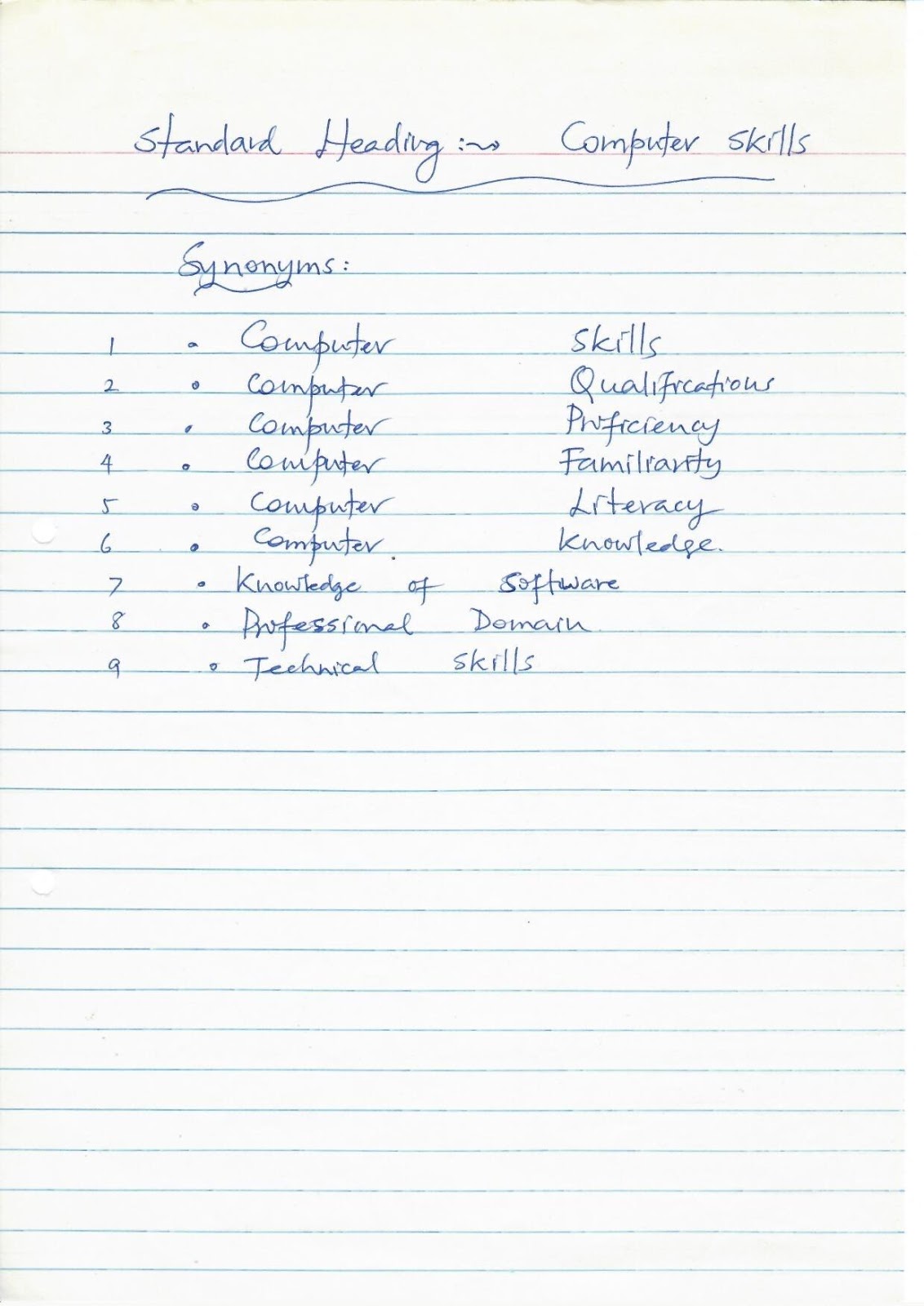
Heading → Computer Skills
Synonyms:
- Computer
Skills
- Computer
Qualification
- Computer
Proficiency
- Computer
Familiarity
- Computer
Literacy
- Computer
Knowledge
- Knowledge
of Software
- Professional
Domain
- Technical
Skills
Standard
Heading → Publications
Synonyms:
- Publications
- Papers
Published & Presented
- Author
and Editor of
Standard
Heading → Awards
Synonyms:
- Awards
- Awards
Received
- Honours
& Awards
Standard
Heading → Membership
Synonyms:
- Membership
- Member
of Professional Bodies
- Professional
Membership
- Academic
& Professional Activities
Standard
Heading → Professional Qualifications
Synonyms:
- Professional
Qualifications
- Professional
- Professional
Certifications
- Professional
Courses Attended
- Summary
of Skills & Professional
- Certifications
- Specialized
Course
- Training/s
- Training
Availed
- Training
/ Special Achievement
- Details
of Training
- Other
Courses / Memberships
- Additional
- Trainings
Attended
Standard
Heading → Education
Synonyms:
- Education
- Education
Details
- Educational
Background
- Educational
Qualification
- Educational
Qualifications
- Technical
Qualifications
- Academics
- Academic
Qualifications
- Academic
Credentials
- Qualifications




No comments:
Post a Comment