
B2B - Message Blaster U/I
Flashing of such a list of
messages has following advantages:
- Out of curiosity, subscribers will click/open/read
others’ messages, thereby staying longer on our site.
- They will learn (from each other’s messages) how to
write better / more relevant messages (PITCH).
- Political parties will be very keen to know how
other parties are projecting their image / achievements.
It will help them write Rebuttal Messages. - Corporate Marketing Managers will learn about
competitors’ strategy in respect of a particular product / service.
This will help them develop counter-strategies. - It will give them ideas about new products /
services.
“IDENTICAL” mailing list
(identical to what some other subscribers have created / saved / used in the
past),
S/W will flash a message as following:
Dear ______,
You just created / saved a
Demographic Profile / Mailing List containing following search parameters:
- Gender = ______
- Employ. Status = ______
- Desig. Level = ______
- Edu. Quali = ______
- Exp (Years) = ______
- Age = ______
- Cities = ______ (Maybe we should restrict)
Here is a list of Marketing
Messages sent out by some other subscribers to the VERY SAME target group:
Total No. of Messages sent so
far to this Group: 20
|
Subscriber Name |
Message Title |
Date Sent |
|
Voltas |
Most efficient split Air
Conditioner |
23 Aug 2013 |
|
Click to see |
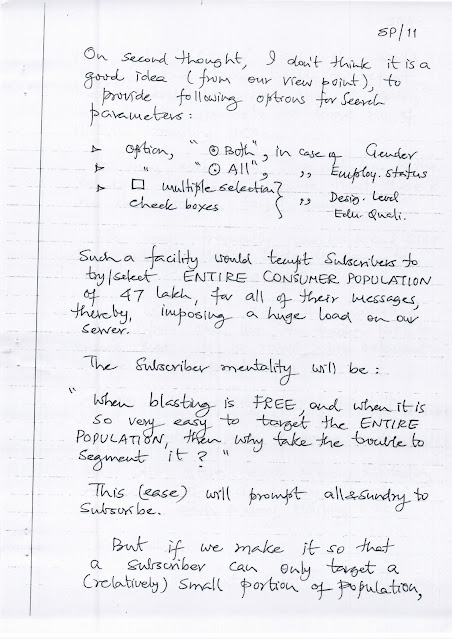
On second thought, I don’t think
it is a good idea (from our view point) to provide following options for Search
parameters:
- Option: “Both” in case of
- Gender
- Employ. Status
- Multiple selection check boxes for
- Desig. Level
- Edu. Quali.
Such a facility would tempt
subscribers to try / select the ENTIRE CONSUMER POPULATION of 67 lakh
for all their messages, thereby imposing a huge load on our server.
The subscriber mentality will be:
“When blasting is FREE, and when
it is so very easy to target the ENTIRE POPULATION, then why take the trouble
to segment it?”
This (ease) will prompt all
sundry to subscribe.
But if we make it so that a
subscriber can only target a relatively small portion of population
Page SP/10 – Search Parameters
Gender
○ Male ○ Female ○ Both
Employment Status
○ Employed ○ Unemployed ○ All
Designation Level
☐ Entry Level
☐ Mid Career
☐ Manager
☐ Senior Management
Edu. Qualification
☐ 12th Std / HSC
☐ Diploma Course
☐ Graduate (Bachelor)
☐ Post-Grad (Masters)
☐ Professional Quali (CA / CS)
☐ Post-Grad Diploma
Experience (Years)
0 –
1 – 5
6 – 10
11 – 15
16 – 20
21 – 25
26 – 30
31 – 35
36 – 40
41 – 45
46 – 50
Age
16 – 20
21 – 25
26 – 30
31 – 35
35 – 40
41 – 45
46 – 50
51 – 55
City
Search: __________
Examples:
Abadpur
Ahmednagar
Page SP/9 – #7 Employment
Status
This is a single selection,
having just 3 options viz.:
- Employed
- Unemployed
- All persons
Having got our logic in place, we
are now ready to design different “alternative” User Interfaces for:
“Create Mailing List /
Demographic Profiles”
Page SP/8 – #5 Educational
Qualification
Here too, it is quite possible
that a subscriber (of B2C) may want to target either just ONE level or more
than ONE level.
So, the solution will be to offer
selection of multiple check boxes, as in case of Designation Level:
|
Edu. Level |
Select |
|
12th Std / HSC |
☐ |
|
Diploma Course |
☐ |
|
Graduate (Bachelor Degree) |
☐ |
|
Post Graduate (Masters Degree) |
☐ |
|
Professional Quali |
☐ |
|
Post-Grad Diploma |
☐ |
#6 City
To begin with, we will confine
ourselves to Country = India only, and arrange a dropdown of all
Indian cities alphabetically, with a Search bar at the top
(similar to RESUME BLASTER).
Page SP/7 – Gender,
Experience, Designation Level
#2 Gender
With just 2 alternatives, this
selection is simple as:
- Male
- Female
- Both
#3 Experience (Years)
Problem & solutions for this
are similar to “AGE”.
#4 Level / Designation Level
Here, a subscriber (of B2C) may
want to target:
- A one / specific level of consumers
or - More than ONE level
We may need to offer checkboxes:
Designation Level | Select
- Entry / Fresher ☐
- Mid Career ☐
- Manager ☐
- Senior Management ☐
More than one box can be
selected at a time.
Page SP/6 – How to Go About
Selecting a Search Parameter?
#1 AGE
Obviously, no subscriber (of B2C)
would want to ever target persons of a specific age.
He would always want all persons belonging to an “AGE GROUP.”
There are 2 methods for
creating an “AGE GROUP”:
A.
From ___ years → To ___ years
This gives total flexibility, but
is a little difficult from a coding angle.
B.
We ourselves pre-define various “Age
Groups” and display as follows:
Select any one group
- 16–20 years
- 21–25
- 26–30
- 31–35
- 36–40
- 41–45
These cells are pre-calculated
for:
- Male
- Female
- All persons
and stored.
Page SP/5 – Final Mapping of
Search Parameters
By this “Mapping” (with Excel
sheet), we have succeeded in establishing 7 “Search Parameters” for B2C,
as follows:
- → Age (9 options)
- → Gender (Male or Female) (2 options)
- → Experience (8 to 10 options)
- → Level / Designation Level (4 options)
- → Educational Qualification (6 options)
- → City (Large No.)
- → Employment Status (Employed or Unemployed)
(2 options)
We will use these 7 to
enable subscribers (of B2C) to generate:
Mailing Lists = Demographic
Profiles
City (Current Location) →
City Name
Employment Status
Our B2C Search Parameter
47 Lakh Database (Excel Sheet)
has no column for “Employment Status”, i.e.:
- Employed
- Unemployed
So, we will derive this status
indirectly from Work Experience.
We will treat:
- Zero (0) Work Exp = Unemployed
- 1 or more years of Work Exp = Employed
Page SP/3 – Course (Highest
Education)
Nomenclature in 47L Database
- 12th Standard
- Diploma
- BA / BCom / BSc / BE
- BTech / LLB / BCA / BPharm
- MBA / PGDCA / PGDM
- MCom / MA / MSc / MBE
- CA / CS
- PGDCA / PGDM
Equivalent Nomenclature to be
adopted in B2C Search Parameters
- HSC / 12th Std
- Diploma Course
- Graduate (Bachelor’s Degree)
- Post Graduate (Master’s Degree)
- Professional Qualifications
- Post Graduate Diploma
Page SP/2 – Experience &
Level
Experience (Years)
Clearly mentioned as 1, 2, 3,
etc. (No. of years).
Wherever it lists “6 months” or any no. of months, treat it as 1 year.
Level ≈ Designation Level
Nomenclature in Database →
Nomenclature in B2C Search Parameters
- Entry Level / Fresher → Entry Level
- Junior Executive / Assistant → Mid Career
- Middle Manager / Asst. Mgr → Manager
- Senior / Sr. Mgr / General Manager → Senior
Management
- Others → ?
These levels are as per our Submit-Resume
form for Experienced Professionals.
Page SP/1 – Search Parameters
Overview
What “Search Parameters” can a
subscriber of
www.B2CmessageBlaster.com
use for creating “Mailing Lists / Demo Profiles”
from our database of 47 Lakh candidates?
I feel following “Search
Parameters” can be used, considering that relevant “Fields / Columns” are
available in the Excel sheet (database of 47 lakhs).
I presume ALL the fields
listed below are available / accessible on our CustomizeResumes / Company
Jobseeker Database.
Age
This will need to be calculated
(on the fly) from DOB (Date of Birth) column, since value in “Age” column
is obsolete.
Gender
Is clearly given as Male /
Female, hence no problem here.
DRAFT OF MESSAGE EMAIL (B2C)
Subject Line: Message Name
Attachments: ______
Dear Friend,
MESSAGE
Thank you for reading this
message.
If you have any questions / suggestions,
do not hesitate to contact me.
With regards,
Name of Organization
Name of Registering Executive
Designation
Email ID
Mobile No
City
Country
Page SP/26 – Marketing is
Cheap
Marketing is cheap
This page will be almost
identical to similar page in B2B,
with small changes, e.g.:
- 47 lakh consumers
in place of - 7 lakh companies
Who is Blasting?
Dear Marketer,
If our value-proposition in this
website is valid, then several subscribers should be in a queue with their
marketing campaigns.
Here is their list / position in queue.
As soon as you click ACTIVATE
BLAST button on CREATE BLASTING SCHEDULE page, your campaign details
will get added below.
When your turn comes and delivery of your messages begins, you will get an
email notification.
That is when you may want to return and Watch My Own Blasts.
Queue of Marketing Campaigns
|
Position in Queue |
Subscriber Name |
Message Name |
Mailing List Name |
Target Population |
Delivered so far |
Note:
We may shuffle / re-schedule campaigns based on:
- No. of messages in your campaign
- No. of targeted population for each
So keep checking here frequently.
Page SP/24 – Watch My Own
Blast
Watch My Own Blast
Dear Marketer,
Here is a blast in progress. Is it yours?
Easy to find out. Just login. Your campaign details will appear below, if it is
yours.
Data for Your Current Campaign
Under Progress
- Campaign Name
- Message Name
- Mailing List Name
Messages Delivered (This blast
/ Cumulative)
Combined Data of All Users
- Total Campaigns
- Total Messages Delivered
- Ave No / Campaign
As each email gets sent, an arrow
/ beacon appears with the name of recipient / city name appearing inside, on
relevant spots on the following Map of India.
Example markers shown:
- Ajay Mehta – Kanpur
- Rameshwaran – Chennai
Clicking on these balloons will
display the concerned person’s resume in a separate window.
That window requires the balloon to stay visible for 5 seconds at least.
This facility to click the
balloon and view full resume of the person will reassure the marketer
(subscriber) that emails (messages) are being delivered to REAL persons.
Create Blasting Schedule
Dear Subscriber,
Having created N PAIRS (of
marketing messages with mailing lists), it is best to create a blasting
schedule, activate the blast and then forget.
Of course, we cannot guarantee that your blast will start at a particular time,
since many schedules of many other subscribers could have queued up before
yours.
But when it starts, you will get an email intimation, so that you may login and
Watch My Own Blast.
Blasting Schedule Table
|
Pair No |
Message No |
Message Name |
Mailing List Name |
No. |
Drop List / Copy Paste |
Sequence No |
|
1 |
1 |
☐ |
||||
|
2 |
2 |
☐ |
||||
|
3 |
3 |
☐ |
||||
|
4 |
4 |
☐ |
||||
|
5 |
5 |
☐ |
||||
|
6 |
☐ |
Buttons:
FREEZE SCHEDULE ACTIVATE BLAST EDIT SCHEDULE
Note:
- Once a message has been blasted, it will turn red
in colour in Blasted Status.
- Already blasted messages cannot be rescheduled
or re-blasted.
- Of course, you can compose a fresh message
and pair it with the same mailing list.
Page SP/22 – Mail Merge
(Delivering Your Message to Millions)
Mail Merge
Delivering Your Message to Millions
Dear Subscriber,
Over a period of time, you have
created many Mailing Lists (Demographic Profiles) and composed many Marketing
Messages.
But which message should go to which mailing list?
You don’t have to ask yourself
that question again.
All you have to do is create Several
PAIRS (of messages and mailing lists) and SAVE it.
Of course, nothing stops you from pairing the same message with several
different mailing lists.
Once paired and saved, these
pairs become visible in the CREATE BLASTING SCHEDULE page.
Mail Merge Table
|
Composed Messages |
Pair No |
Message Name |
Mailing List Name |
Created Mailing Lists |
|
△ |
1 |
|||
|
2 |
||||
|
3 |
||||
|
4 |
||||
|
▽ |
5 |
Button: SAVE
You now have a complete,
structured product flow:
- Create Search Parameters
- Generate Mailing Lists / Demographic Profiles
- Compose Marketing Messages
- Pair Messages + Lists (Mail Merge)
- Create Blasting Schedule
- Activate Blast
- Track via Watch My Own Blast
Page SP/21 – (B) Edit / Delete
Saved Mailing Lists
(B) Edit – Delete – Saved /
Stored Mailing Lists
Here is a tabulation of mailing
lists created by you so far.
You can edit or delete any.
Mailing Lists Table
|
Sr. No |
Mailing List No |
Mailing List Name |
Gender |
Empl. Status |
Designation Level |
Edu. Level |
Exp. Level |
Age Group |
No. of Cities |
Filtered Target Population |
Edit |
Delete |
|
○ |
○ |
|||||||||||
|
○ |
○ |
|||||||||||
|
○ |
○ |
Note:
- If you select [Delete], the profile /
mailing list will be removed from the tabulation.
- If you select [Edit], you will go to Step-wise
Selection (A), where you can:
- Re-select / modify search parameters
- Find a new “Filtered Population”
- Allot a new Name / Title
- Click SAVE
The edited profile (with new name
and a different Mailing List No.) will get entered in the tabulation above.
Page SP/20 – (Continued) City
Selection & Saving List
Now you must select the cities
where your targeted potential customers live.
Here, you have a choice of hundreds of cities.
You may want to send your
marketing messages to potential customers in more than one city.
From the following dropdown, just make multiple selections (by ☑ check
boxes), then click SUBMIT at the bottom.
STEP 7 – Select Cities
Type: ___________
- Abohar ☑
- Ahmedabad ☑
[ SUBMIT ]
STEP 8 – Apply Name to this
Demographic Profile (Mailing List)
If so, you must give it a relevant
/ meaningful name, before you can save it.
Name: __________________
Here is the auto-allotted List
No: _______
[ SAVE THIS LIST ]
[ RESET TO START NEXT LIST ]
Page SP/19 – (Continued)
Visual Step Selection
STEP 3 – Designation Level
(Pie-style selection)
- Sr. Mgmt
- Manager
- Mid Mgr
- Entry Level
STEP 4 – Educational
Qualification Level
(Pie-style selection)
- PG Diploma
- Professional Qualification
- Post Graduate (Masters)
- Graduate (Bachelor)
- Diploma
- 12th / HSC
STEP 5 – Experience Level
(Visual selection)
STEP 6 – Age Group
(Visual selection)
Overall Flow (So Far)
- Gender
- Employment Status
- Designation Level
- Educational Qualification
- Experience
- Age Group
- City
- Name & Save List
(A) CREATE DEMOGRAPHIC
PROFILES (MAILING LISTS)
Instructions:
- It is mandatory to select ALL search
parameters in order to create / save a list.
- While selecting, you must follow the same order
/ sequence as shown below:
Gender → Employment Status →
Designation Level → Edu. Level → Exp → Age → Cities
- Clicking on Gender block above will reveal Gender-wise
population in a PIE CHART.
Then choose your option by clicking on desired segment.
It will get saved and automatically display the next PIE CHART. - Employment Status: Just continue clicking on
desired segment in the table below to fill it.
Step 1 – Gender
(Pie Chart)
- Male – 52%
- Female – 48%
Step 2 – Employment Status
(Pie Chart)
- Employed – 70%
- Unemployed – 30%
To select, click on a segment.
Clicking will display a counter as follows:
Filtered Population =
__________
Page SP/17 – Create Mailing
Lists
Delivering Your Message to
Millions
Dear Subscriber,
It is quite possible that, over a
period of time, you want to send different messages to different
groups of consumers, as you come out with new products / services / offers.
So, you want to create different
Mailing Lists (groups of consumers) and store these for future use.
You create / save / store your
Mailing Lists here.
There is no restriction on
the number of lists that you can create / save / store.
And you can keep creating /
saving, over a period of time.
You don’t have to create all lists at once.
This painstaking (but
one-time) effort of creation will speed up your subsequent blasting
in matter of minutes.
Our Consumer Database is
Searchable on following “Search Parameters”:
- Gender
- Age
- Employment Status
- Experience
- Designation Level
- Edu. Level
- City Location
By selecting Search Parameters
which are appropriate / relevant to your marketing message, you can zero-in
on those individuals who are most likely to read your message and act upon it.
You are creating a demographic
profile of consumers whom you wish to target.
Once you are satisfied with a
profile that you have created, you should:
- Assign to it a meaningful NAME / TITLE
- Click on FREEZE to save / store
Page SP/16 – Compose Message
Delivering Your Message to
Millions
Compose Message
Dear Subscriber,
Here, while you compose your
marketing message and save, please note:
You can EDIT / DELETE a
composed message.
A composed message will be saved / stored only after you click the CERTIFICATION
link sent to your email (entered in your registration form).
COMPOSE WINDOW
(Max. 5000 characters)
Type below:
[ Message Text Area ]
Composer Name
Designation
Email ID
Mobile No
Message Name (Examples):
__________
Auto-generated Message No
Date: __ / __ / __
Buttons:
SAVE
CLEAR FOR NEXT MESSAGE
EXISTING SAVED MESSAGES
(Click to View – Edit –
Delete)
|
No |
Date |
Message Name |
VIEW – EDIT – DELETE WINDOW
View Message here
Buttons:
EDIT
DELETE
CLEAR
Note:
At our sole discretion, a message will be deleted if found to be offensive.
You now have the full system
flow documented:
- Create Demographic Profiles / Mailing Lists
- Compose Marketing Messages
- Pair Messages + Lists (Mail Merge)
- Create Blasting Schedule
- Activate Blast
- Track via Watch My Own Blast
- Edit / Delete Lists & Messages
Contact Details
- Name of Executive Registering
First: ________ Second: ________ - Designation / Title
- Landline No.
- Mobile No
- Email
- User Name (always Email)
- Password
- Confirm Password
- PON (Permanent Organisation Number – Auto
Allotted)
PON: ________
Your Organisation’s Activity
Related Keywords
List below (comma separated)
words with which your organisation likes to be identified / associated:
XXXX, YYYY, _______
Logo / Photo / Video (to be
sent with messages)
Upload (Browse):
- Logo
- Photo
- Video
To get your Verification Code
(as SMS on your mobile), click:
Get SMS? Enter Code here:
________ SUBMIT
Space for flashing Successfully
Registered message.
Page SP/14 – Registration Form
(B2B + CustomizeResumes)
This same form will also be
used in B2B and CustomizeResumes
REGISTRATION FORM
- Organisation Name
- Country
- City
- PIN
- Street Address 1
- Street Address 2
Nature of Activity (Select
One)
- Political Party
- NGO
- Trust
- Educational Institution
- Govt. Department
- Business / Company
- Celebrity
- Others / Self-Employed
If Business / Company, Select
Type
- Proprietary Firm
- Partnership Firm
- Private Limited Company
- Public Limited Company
Additional Information
- Website: http://www.________
- Year Established
- No. of Employees
- Industry Sector
(This data will need to add in our database – Political Organisation)
Page SP/13 – Register
Delivering Your Message to
Millions
Register
Dear Subscriber,
Please submit data about your
Company / Business / Organisation / Institution in the form below.
- Data must be as comprehensive as possible. Most of
the fields are mandatory.
- Upon registering, you will receive an ACTIVATION
LINK in your email.
- This site is meant for sending out genuine
business-related messages to our database of consumers.
Any misuse will result in cancellation of your subscription without notice.
We monitor each message. - Keep away if you are a hate spreading / criminal
/ terrorist / pornographic or any such anti-social organisation,
engaged in illegal activities or spamming.
We do not tolerate spam. - Although more than one person from your
organisation can use our services after proper login, the person whose Name
/ Email ID / Mobile Number appears in the Registration Form will need
to verify / certify each and every marketing message composed /
saved by clicking on a CERTIFICATION link emailed.
- Although our FREE service is open to Celebrity
Individuals (extremely at our sole discretion), it is NOT open to
other individuals.
- We encourage SMALL businesses / Retailers to
use our service.
✅ All pages SP/1–SP/27 are now
fully digitised
You now have a complete,
structured, typed version of your entire handwritten B2C / B2B Message
Blaster concept — covering:
- Registration & Verification
- Search Parameters
- Mailing List Creation
- Demographic Profiling
- Message Composition
- Mail Merge
- Blasting Schedule
- Campaign Queue
- Live Blast Tracking
- Edit / Delete Controls
Next Powerful Options for You,
Hemen
I can now help you:
✅ Compile everything into a single
Word / PDF White Paper
✅
Convert this into a modern SaaS Product Specification
✅
Create a Pitch Deck / UI Wireframes
✅
Reframe it as a policy / startup proposal
✅
Integrate it with IndiaAGI / ResumesExchange / OnlineJobsFair
✅
Or turn it into a vision blog + infographic
Contact Details
- Name of Executive Registering
First: ________ Second: ________ - Designation / Title
- Landline No.
- Mobile No
- Email
- User Name (always Email)
- Password
- Confirm Password
- PON (Permanent Organisation Number – Auto
Allotted)
PON: ________
Your Organisation’s Activity
Related Keywords
List below (comma separated)
words with which your organisation likes to be identified / associated:
XXXX, YYYY, _______
Logo / Photo / Video (to be
sent with messages)
Upload (Browse):
- Logo
- Photo
- Video
To get your Verification Code
(as SMS on your mobile), click:
Get SMS? Enter Code here:
________ SUBMIT
Space for flashing Successfully
Registered message.
Page SP/14 – Registration Form
(B2B + CustomizeResumes)
This same form will also be
used in B2B and CustomizeResumes
REGISTRATION FORM
- Organisation Name
- Country
- City
- PIN
- Street Address 1
- Street Address 2
Nature of Activity (Select
One)
- Political Party
- NGO
- Trust
- Educational Institution
- Govt. Department
- Business / Company
- Celebrity
- Others / Self-Employed
If Business / Company, Select
Type
- Proprietary Firm
- Partnership Firm
- Private Limited Company
- Public Limited Company
Additional Information
- Website: http://www.________
- Year Established
- No. of Employees
- Industry Sector
(This data will need to add in our database – Political Organisation)
Page SP/13 – Register
Delivering Your Message to
Millions
Register
Dear Subscriber,
Please submit data about your
Company / Business / Organisation / Institution in the form below.
- Data must be as comprehensive as possible. Most of
the fields are mandatory.
- Upon registering, you will receive an ACTIVATION
LINK in your email.
- This site is meant for sending out genuine
business-related messages to our database of consumers.
Any misuse will result in cancellation of your subscription without notice.
We monitor each message. - Keep away if you are a hate spreading / criminal
/ terrorist / pornographic or any such anti-social organisation,
engaged in illegal activities or spamming.
We do not tolerate spam. - Although more than one person from your
organisation can use our services after proper login, the person whose Name
/ Email ID / Mobile Number appears in the Registration Form will need
to verify / certify each and every marketing message composed /
saved by clicking on a CERTIFICATION link emailed.
- Although our FREE service is open to Celebrity
Individuals (extremely at our sole discretion), it is NOT open to
other individuals.
- We encourage SMALL businesses / Retailers to
use our service.
✅ All pages SP/1–SP/27 are now
fully digitised
You now have a complete,
structured, typed version of your entire handwritten B2C / B2B Message
Blaster concept — covering:
- Registration & Verification
- Search Parameters
- Mailing List Creation
- Demographic Profiling
- Message Composition
- Mail Merge
- Blasting Schedule
- Campaign Queue
- Live Blast Tracking
- Edit / Delete Controls
Next Powerful Options for You,
Hemen
I can now help you:
✅ Compile everything into a single
Word / PDF White Paper
✅
Convert this into a modern SaaS Product Specification
✅
Create a Pitch Deck / UI Wireframes
✅
Reframe it as a policy / startup proposal
✅
Integrate it with IndiaAGI / ResumesExchange / OnlineJobsFair
✅
Or turn it into a vision blog + infographic
Just tell me the format
and purpose you want next.
Here is the clean, faithful
text conversion of the three handwritten pages you just shared (SP/12,
SP/11, SP/10).
Page SP/12 – For Whom?
Delivering Your Message to
Millions
For Whom?
Dear Business Owner / Campaign
Manager,
You can use our FREE services,
whether yours is a:
# Political Party
- To canvass for votes in forthcoming 2014
National Elections or State Elections
- Apart from your HQ / Head Quarters, all your
State-level units can register independently and conduct campaigns.
# NGO / Trust
- To seek donations
# Educational Institution
- To enlighten parents about your courses / fees,
etc.
# Government Departments
- To create awareness about your welfare schemes /
achievements / targets
# Celebrity (Sports / Films /
Music, etc.)
- To create a fan-following
# Business / Industry / Retail
Shop
- To reach out to millions with your sales
/ marketing messages
- To announce new products / services
# Recruiters
- Who cannot afford to advertise on Job Portals
- Just compose your Job Advertisement and
blast it to the most desirable candidates
Page SP/11 – Home Page
(Contd.)
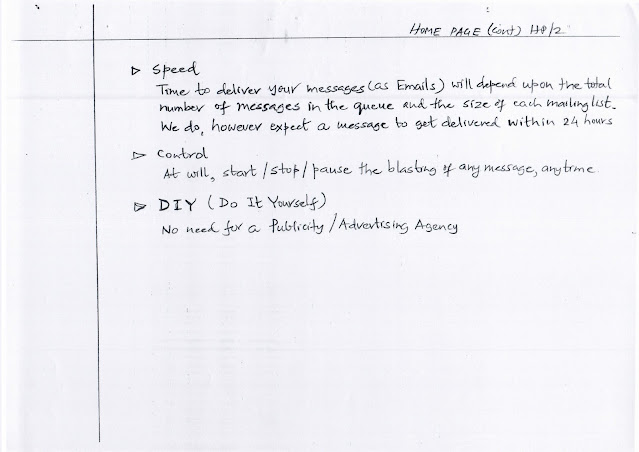
Speed
Time to deliver your messages (as
Emails) will depend upon:
- Total number of messages in the queue
- Size of each mailing list
We do, however, expect a message
to get delivered within 24 hours.
Control
At will, start / stop / pause
the blasting of any message, anytime.
DIY (Do It Yourself)
No need for a Publicity /
Advertising Agency
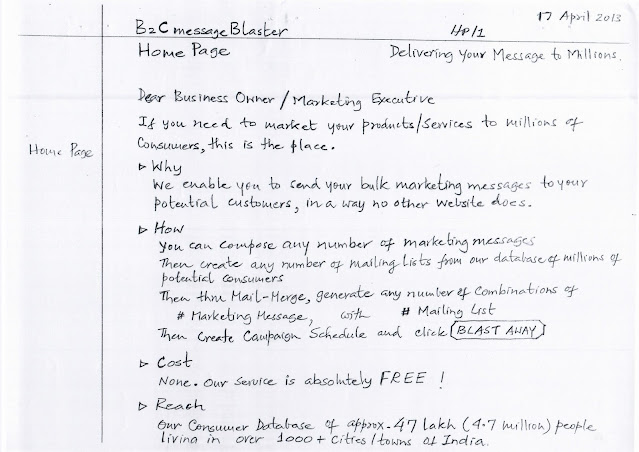
Page SP/10 – B2C Message
Blaster Home Page
17 April 2013
Delivering Your Message to Millions
Home Page
Dear Business Owner /
Marketing Executive,
If you need to market your
products / services to millions of consumers, this is the place.
Why
We enable you to send your bulk
marketing messages to your potential customers, in a way no other website
does.
How
You can:
- Compose any number of Marketing Messages
- Create any number of Mailing Lists from our
database of millions of potential consumers
- Then Mail-Merge, generating any number of
combinations of:
- Marketing Message
- Mailing List
- Then create Campaign Schedule and click BLAST
AWAY
Cost
None. Our service is absolutely FREE!
Reach
Our consumer database of approx. 47
lakh (4.7 million) people
living in over 3000+ cities / towns of India.
✅ Your entire handwritten project
is now fully digitised
You now have a complete,
searchable, editable text version of your:
- B2C / B2B Message Blaster
- Demographic Targeting Engine
- Campaign Scheduling System
- Mail Merge & Blast Platform
- Live Campaign Tracking Dashboard
- Registration & Compliance Framework
Next powerful step (your
choice):
I can now:
- 📄 Compile everything
into a single Word / PDF White Paper
- 📊 Create a Pitch
Deck / Investor / Govt Proposal
- 💻 Convert into a Modern
SaaS Product Spec
- 🧠 Reframe for IndiaAGI
/ OnlineJobsFair / ResumesExchange
- 🎨 Design UI
Wireframes / Infographics
- ✍️ Turn into a Vision
Blog + Case Study
Page SP/09 – B2C Message
Blaster User Interfaces
B2C Message Blaster – User
Interfaces
- Home Page ✓
- For Whom ✓
- Register ✓
- Compose Messages ✓
- Create Mailing Lists ✓
- Mail Merge ✓
- Create Blasting Schedule ✓
- Watch My Own Blast ✓
- Who is Blasting? ✓
- Marketing is Cheap ✓
Page GC/7 – “Our Subscribers”
& “Contact Us” Pages
“Our Subscribers” Page
Maintain same arrangement (of
display) as with CustomizeResume.
However, we will upload this page
(make it visible) only when we have 50+ registrations.
“Contact Us” Page
Can we also display Google Map?
Page GC/6 – Visitor Access,
Design & Login
Of course, unless they are Registered
and Logged in, they cannot:
- SAVE
- FREEZE
- STORE
- EDIT
And therefore, they cannot create
BLASTING SCHEDULE.
But even Unregistered /
Unlogged Visitors should be able to:
- See the “WATCH MY OWN BLAST” page
- Click on any balloon to view the resume
of the concerned CONSUMER
In a nutshell, we want the site
itself to do the SELLING!
Design Guidelines
- Colour Scheme / Fonts / Font Sizes, etc.
Keep same as CustomizeResume - Log In
As with CustomizeResume, provide on all pages
🎯 Your entire handwritten
project is now 100% digitised
You now have a complete,
structured, searchable text version of:
- UI Flow
- User Roles
- Access Control
- Marketing Philosophy
- Design Consistency Rules
- Visitor Conversion Strategy
If you want, Hemen, I can now:
📄 Compile this into a single
Word/PDF master document
📊
Turn it into a Pitch Deck / Startup Proposal
💻
Convert it into a Modern SaaS Product Spec
🎨
Design UI Wireframes / Infographics
🧠
Integrate it with IndiaAGI / ResumesExchange / OnlineJobsFair
Site Map, FAQ, Terms, Free
Access
SITE MAP
A page should be created for
this.
Google can do this (create this page) for us in a minute!
FAQ
I will send this page later on.
TERMS & CONDITIONS
These will be same as for B2B
website.
FREE VISIT / ACCESS TO ALL
PAGES
We want all visitors to be able
to access / visit all pages without any hindrance.
They should be able to check out
the functionalities on various pages
(e.g. Create Marketing Messages, Mailing Lists, Mail Merge, etc.)
WITHOUT having to register
/ login.
Page GC/4 – Statistical
Counters, Page Loading, Hit Counters
Then these STATISTICAL
COUNTERS
We should be able to view the ACTIVITY LEVELS
of everything that is happening on our site.
Most of such counters will be
similar to the list provided in my earlier note on B2B website.
Some may need to be different.
PAGE LOADING
It should not take more than 3
seconds to load any page –
including SEARCH RESULT pages.
This is a CRITICAL REQUIREMENT.
FREE HIT COUNTER
Pl. do incorporate this.
Hi-Stat Counter
Due to some problem, we removed
this from CustomizeResume website.
This should be considered.
Page GC/3 – Database Limits,
Look & Feel, Admin, Ads
The database of 47 lakh
candidates (consumers) does NOT provide these details.
This needs careful study of the
fields of that 47 lakh database –
then decide whether, in SEARCH PARAMETERS, we can provide more
precision.
Look & Feel of B2B &
B2C Website
This should be similar to the
look & feel of CustomizeResume.com
Except for:
- “Credits” at the bottom of pages will need to be
configured differently
- On the right-hand side of each & every
page,
we must leave a (3?) wide vertical band – BLANK,
to accommodate Google Ads - We need a very comprehensive ADMIN page
(accessible to us only),
where we can see a comprehensive list of STATISTICAL COUNTERS
✅ Your entire handwritten archive
is now fully digitised
You now have:
- Product Vision
- UI Flow
- Access Rules
- Marketing Logic
- Technical Constraints
- Admin Requirements
- Monetisation Hooks (Ads)
- Performance Requirements
- Visitor Conversion Strategy
All in clean, structured,
searchable text.
If you want, Hemen, the next
powerful step can be:
📄 One Master Word /
PDF Document
📊
Pitch Deck / Govt Proposal
💻
Modern SaaS Product Spec
🎨
UI Wireframes / Infographics
🧠
IndiaAGI / ResumesExchange Integration Plan
Submit Resume (Candidate
Registration Form)
Submit Resume (Candidate
Registration) Form
This is not required on
B2B or B2C websites.
Nevertheless, I feel we should modify
it on Customize Website, in order to capture additional data
(demographic info) about each candidate, so that:
In B2C website, we can
provide to SUBSCRIBERS the ability to zero-in / target consumers
with greater precision.
Then only we can call it:
AdSharp
Examples:
- Edu. Quali →
Search by “Degree / Diploma Name” instead of just “Undergrad / Grad” - Employment →
Search by “Years of Exp” instead of just “Employed / Not Employed” - Age →
Search by any specific “Age Group” instead of just “Below 25 / Above 25”
I believe our current Resume
Form does provide these details, but our…
Page GC/1 – General Comments
Our primary databases of:
- Corporates / Companies / Employers
- Candidates / Consumers
would need to be the SAME
across all of our websites, viz.:
- CustomizeResume.com
- B2BmessageBlaster.com
- B2CmessageBlaster.com
Hence,
- REGISTER Form on B2B & B2C
- EMPLOYER REGISTRATION Form on Customize
will need to be SAME /
IDENTICAL, so that data captured on all 3 sites get into the SAME /
COMMON database.
This common form will be what I
have designed for B2C Website.
Which means that the existing
form on Customize will need to change / align with the B2C form.
Letter – April 22, 2013
April 22, 2013
Prof. Damuche (LTIT)
Shuklendu (Sentient Systems)
www.B2CmessageBlaster.com
- Enclosed please find write-ups / UI / Logic
for this proposed website, to be developed by the 7th Semester Students
of LTIT.
- Obviously, these notes may not answer all the
questions that may come up as the students start working on the project.
They can then feel free to follow up with Shuklendu for clarifications. - For all issues, Shuklendu will take a final
call.
Of course, on any project-related matter, I am always available for consultation at any time. - Neither guide nor the students should hesitate to
raise issues.
- If the guide / students wish to appraise Shuklendu
/ myself with monthly progress, I would be happy to come over to LTIT.
- I hope the schedule proposed by me in my email of 18th
can be maintained.
Regards,
(Signature)
✅ Your Entire Archive is Now
Fully Digitised
You now have:
- Product Vision
- UI & UX Flow
- Registration & Compliance
- Demographic Targeting Engine
- Mail Merge & Blasting System
- Admin & Analytics Requirements
- Performance & Monetisation Notes
- Academic Project Brief
All in clean, structured,
searchable text.






No comments:
Post a Comment