
Hand over
Date: 21-12-09
To: Rahul, Shalaka
Here are a few things which I can
think of at the moment. Two of you should jointly prepare a comprehensive list
and give me a copy on 23rd before lunch:
- Weekly back-ups
- Visit to Reliance IDC to introduce Shalaka to the
concerned people with whom she will need to deal with. Official intimation
to them. (Note on side: Not Required)
- Promo email blasting procedures (online/offline)
and related databases.
- Access to "source-codes" of all our past
& present websites (3P / Strategic HR / WWJ / GR / IK / RecruitGuru /
CustomizeResume) & where these are stored.
- Access to "source-codes" of all the TOOLS
that we have developed in the past 10/12 years. Some of these tools were
for our own website development purpose and some were for use by
3P/General public. (Note on side: CD given to Rohan by Reeva)
- Any balance-work re: 3P's softwares/ISYS etc.
- [Struck through] Procedure to shutdown
IndiaRecruiter.net (as & when necessary) and to resurrect it entirely
OFFLINE on local server.
- Procedure to resurrect OFFLINE for W-W-J,
RecruitGuru / Global Recruiter.
- (Note: 2 files missing)
- (Note: ✓ online)
Scan_0002.jpg
Hand over (Page 2)
- Location of various databases / Masters &
"access rights" to the same.
- I presume, you will complete the following on your
own before 20th Jan:
- a. (Shalaka) Job Advt. Database problem
(TOP PRIORITY)
- b. (Poonam) Market yourself? (Depending on
PDF download success)
- c. (Poonam) Free Resume Blast? (Depending
on PDF download success)
- d. Recruiter's Section
- e. [Struck through] Extracting additional 3/4 lakh
text resumes & uploading on webserver to start "Is this your
Resume" — from 14 PST files.
- f. 3P's ISYS related problem.
- g. Appointment of 2 Trainee S/W Developers.
- h. Ensuring that Alex completes entire "Job
Post" feature before he proceeds on leave. This is crucial for
uploading "Recruiter Section".
- Procedure for adding new pages/sections on
Customize Resume.
- Whatever "Documentation" you have
prepared (or received from Rajeev) re: CR Architecture.
- 40 consultants of 3P had worked on
"rating" keywords thru Poll-e-Ticks developed by Punam for
calculating "New" weightages. Access to this.
- Source Code for "GuruMine" parsing
(RecruitGuru).
- Pl- also go thru my handwritten notes along with
Shalaka so she knows what is remaining.
(Signed at bottom)
Scan_0003.jpg
Date: 06/09/09
To: Rahul, Shalaka, Punam,
Alex / Rajeev, Abhi
https://www.google.com/search?q=Customize-Resume.com
Enclosed find:
- Two alternative HOMEPAGE layouts
- Page Write-ups
I feel these are the main ones.
If you feel there are some other pages which, too, need some write-up, then let
me know.
Feel free to discuss / ask for
clarifications.
(Signed)
Scan_0004.jpg
Draft of Promo-email which
will go out to every jobseeker whose resume WE parse and upload in Online
database.
Dear [Executive] (Arrow:
Ideally this should be the FIRST NAME of the candidate)
Get A Job...
or get a better job — in case you
already have one. That being your ultimate goal, your immediate objective is to
get the job-advertiser to "notice" your resume, feel impressed and
call you for an interview.
To get "noticed", your
resume must "stand-out". It will, if you "customize" it. We
will help you do that. Absolutely FREE!
We have uploaded YOUR text resume
on our website. You can customize it using:
Your User ID: [Box]
Your Password: [Box]
Scan_0005.jpg
(Continuation of Scan_0004)
Just click here on your
Permanent Executive Number
(PEN) [Box]
to reach our EDIT RESUME page.
If you are UNIQUE, it is up to
you to ensure that your resume too appears UNIQUE!
With regards,
Hemen Parekh
hep@recruitguru.com
Ph: +91-22-670,70,360
Scan_0006.jpg
Layout: Home Page Alternative
#1
Date: 06/06/09
- Header: Customize-Resume | Impress
Interviewers -> Get Job
- Navigation: Site Map | Our Subscribers |
Contact Us
- Sidebar Left: * Employers
- JobSeekers
- Slogans
- Site statistics
- Sidebar Right: Google Ads
Scan_0007.jpg
Layout: Home Page Alt #2
(Based on Google)
Date: 06/06/09 / Added
note: Rahul (Oct 22, 2009)
- Buttons: [Job Seekers] [Free Trial]
[Employers]
- Main Text:
Dear Executive,
May you live for 52.56 million
minutes [100 years]. And spend just 1 minute on this page before clicking. This
is the only Website which enables you to customize your resume (no doubt others
will follow). But, if we are first, you too can benefit to get that
interview-call, if your resume becomes Unique. All our services are FREE to
you. And if you wish to discover how a resume can be customized, in a hundred
different ways and in a matter of minutes, click FREE TRIAL. We do not rewrite
your resume. We let you customize it online, FREE.
Scan_0008.jpg
Layout: JobSeeker Services
By: Shalaka
Dear Jobseeker,
All our services are free for
you:
- Submit Resume
- Customize Resume
- Jobsearch (then Apply Online)
- Resume Blast
- Free Trial (start exploring with this)
- Edit Resume
Login:
User ID: [Box]
Password: [Box]
[Submit Button]
Scan_0009.jpg
Layout: Submit Resume
By: Punam
Dear Jobseeker,
For your convenience, we have
broken-up "Submit Resume" process into several small stages as
follows:
|
Stage |
Title |
Submitting will generate
following Graphs |
|
1 |
Text (Mandatory) |
Function/Skill Profiles |
|
2 |
Education Data |
Education Profile |
|
3 |
Experience Data |
Career Profile / Tenure Profile |
|
4 |
Salary Data |
Salary Profile (Your Relative
Standing) / Salary Growth Profile (Salary Progression) |
|
5 |
Project Data (For IT Prof.
only) |
Project Profile |
|
6 |
Entire Graphical Profile |
(Generated from all above) |
Only stage 1 is mandatory. Rest
are optional and can be submitted at your convenience.
Scan_0010.jpg
Layout: Customize Resume
By: Alex
Dear Jobseeker,
Why must you customize your
resume? It is obvious. Amongst thousands of plain text resumes flooding the
mailboxes of recruiters, your plain text resume has a very poor chance of
getting noticed — even if your resume is the most suitable for the vacancy. It
does not even get a chance to "fight-it-out"!
Result? No "notice"
-> no interview call -> no job!
If your resume is your only
"Marketing Document", you must ensure that it gets "read"
by the recruiters. Which can happen only if your resume "stands out".
And there is only one way you can make it "stand out" — by
"customizing" — not "re-writing" it.
You have following choices:
- Perish with plaintext resume [Box]
- Conquer with customized resume [Box]
[Free Trial Link]
Scan_0011.jpg
Title: Job Search
Dear Jobseeker:
Even without login, you can
conduct a job search and find many suitable jobs here. Not surprising
considering our database hosts over 2 lakh job-advts.
But that is something you can do
on any other job portal. And if you have submitted your resume on those
job-portals, you can also "Apply Online."
Then wait, and wait, and wait;
hoping to hear from the advertiser (— I call it "hoping against
hope"!)
But when you "Apply
online" from here, keep your Mobile "on and charged" to receive
interview-calls from Advertisers. Because your Customized Resume has got them
mesmerized!
— Shalaka
Functional Note:
First login and then select which
Customized Resume Version you want us to forward to the Advertisers, when you
click "Apply Online."
|
Version |
Version Name |
Select |
|
1 |
Master/Default |
O |
|
2 |
XYZ |
O |
|
3 |
ABC |
O |
|
4 |
LNJ |
O |
Scan_0012.jpg
Title: Resume Blast
Dear Jobseeker:
Here is a list of several
thousand Employers/Recruitment Agencies to whom you can blast your
"Customized" resume—absolutely FREE. You can even do it in
stages—over a period of time. Whenever you login, we will show you to whom you
have already sent your resume—and when. So there is no fear of duplication.
First login and then select which
profile/version you wish to forward.
— Punam
Table Section:
| Version | Name | Select |
| :--- | :--- | :---: |
| Master/Default | Master/Default
| O |
| 1 | | |
| 2 | ABC | O |
| 3 | XYZ | O |
| 4 | LNJ | O |
Bottom Table Mockup:
Columns include: [Checkbox] |
Last Date of Blast | Name | No. of Resumes Received | % Result Viewed | %
acknow.
(Note: An arrow indicates that
the last two columns can be seen only by us—not by anyone else.)
Scan_0013.jpg
Title: FREE TRIAL / DISCOVER
CUSTOMIZATION
Dear Jobseeker:
At Customize Resume, you learned
"Why" you need to customize your resume. Here you learn
"How." In fact you already know. Just like icons on your
desktop—which you keep "re-arranging" from time-to-time, to give your
desktop a NEW look, simply drag icons from MASTER/DEFAULT resume and drop into
CUSTOMIZED VERSION, in whichever order you want. Then click [VIEW]. If happy
click [SAVE] and Name the saved version. You can create hundreds/thousands of
versions, but may save a max. of 3 at anytime.
You do NOT need to drag/drop all
icons from the MASTER to CUSTOMIZED. Even ONE will do.
— Shalaka
UI Mockup:
Select: (•) Sample/Demo Resume ||
( ) My own Resume (you need to login first)
|
MASTER / DEFAULT |
CUSTOMIZE |
|
Title |
Title |
|
Text Resume |
Text Resume |
|
Profile 1 |
|
|
Profile 2 |
|
|
Profile 3 |
|
|
Profile 4 |
[VIEW] / [SAVE] / [NEW]
Scan_0014.jpg
Title: EDIT RESUME
Dear Jobseeker:
This is where you edit your
resume—then re-customize it, if you had submitted it ONLINE in the first place
and obtained your User ID / Password.
But you may have received from
us, an email saying: "We had your text resume in our database which we
have uploaded—and your User ID / Password are ABC/XYZ." If so, such a
resume would certainly need editing because our software may not have "extracted"
some data at all or accurately.
As soon as you login, your resume
will appear below—ready for editing:
Log In: User ID [____]
Password [] [Submit]
— Alex
Scan_0015.jpg
Title: Employer Services
Dear Recruiter:
To begin with, we offer you only
two services (—and to begin with, FREE), viz:
- Post Job
- Resume Search
Login Box: User ID []
Password []
And a promise, not to flood your
mailboxes with plain text resumes!
Of course, to use our free
services, you will need to Register. But before that take a FREE TRIAL, to
discover how the "customized Resumes" which you will get in your
mailbox will simplify your life, and dramatically improve the quality of your
"hiring decisions".
— Punam
Scan_0016.jpg
Title: Post Job
Dear Recruiter:
The Post Job form you see below
is quite typical. But you will like the following features:
- Writing "terrific" job descriptions is
not easy. You wish you could see a SAMPLE/TEMPLATE, which you can edit to
suit your unique requirements. No problem. Just type "Job Title /
Designation"—then click "Get Job Description online"—and
copy/paste.
- You can indicate "Salary Offered" in 4
different currencies (Indian Rupees / US Dollars / Euro / British Pound).
This will come in handy for Foreign Recruiters wanting to recruit
professionals from India (or vice versa).
- The moment you select "Function", we
fill-up the "skills / Knowledge keywords" box with relevant
keywords. Feel free to delete/add.
- You can delete your Job Advt whenever you like.
— Rahul
Scan_0017.jpg
Title: Resume Search
Dear Recruiter:
Our Resume Search form may look
quite conventional. But the search-results are anything but conventional!
Notice the following "differences"—all meant to enable you to
"zero-in" on the most relevant candidates, "superfast":
- You get to see graphical/analytical
"customized" resumes. Once you have seen these, you will never
want to read a "plain text" resume anymore.
- All "Salary Graphs" will be shown to you
in the currency of your choice (Indian Rupees / US Dollars / Euro /
British Pound). This enables "Apple for Apple" comparison of
candidates working in any part of the world and getting salaries in
different currencies.
- In search results, resumes are arranged in the
descending order of "Percentile Score"—with the BEST candidates
at the top!
— Alex
Scan_0018.jpg
Header: Urgent AND Important
Rahul -> Shalaka ->
Punam -> Alex
Title: First Impression
You get only ONE chance to make a
good FIRST impression. And that FIRST impression (of User experience) often
spells the difference between success and failure.
You just don't get a SECOND
chance! So, we must pull out all stops. So, what can we do to amaze the
jobseekers—without him having to give us lots of extra data/form filling?
See enclosed graphs A, B, C.
Graphs A and B can be generated
with the SAME data that we are capturing for SALARY-GROWTH graph.
In developing these graphs, I
have assumed:
- Starting salary = Rs. 100,000
- Last salary = Rs. 150,000
- Over a period of = 5.5 years
Scan_0019.jpg
Page 2
To find out what was the
"Compound Annual Growth Rate (salary)", apply the formula:
$$ES (End Salary) = SS (Starting
Salary) \left[ 1 + \frac{r}{100} \right]^t \text{(elapsed period)}$$
$$150,000 = 100,000 \left[ 1 +
\frac{r}{100} \right]^{5.5}$$
$$\therefore r \text{ (Compound
growth rate)} = 7.65\%$$
This is same school-Arithmetic
formula to find "Compound Interest Rate" for "growth of
money".
Maybe you can find some readymade
software-code for this formula on the Web (—Google Code?).
And, we are anyway capturing:
- ES
- SS
- Period
Scan_0020.jpg
Page 3
For meeting 6th Nov. target, we
can simply write CAGR as shown in A.
At a later date, we could create
a separate graph like B or C.
B is relatively simple.
But C is of greater
interest/value to both jobseekers & recruiters alike. It tells the
candidate whether his "compound salary growth over a period of years"
is keeping "pace" with salary-growths (of course "AVERAGE")
of his co-professionals or is he falling behind.
Absolutes are of less interest
than "relative standings"—especially amongst "peers".
If we are able to directly
develop C, then we should bypass B and go straight to C.
In the meantime target A
for Nov. 6.
[Signature]
27/10/09
Scan_0021.jpg: Salary Growth
Graph (Graph Sheet)
This page contains three
hand-drawn graphs illustrating salary progression.
- Graph A: Shows a step-wise progression of
annual salary over 6 years.
- Y-axis: Annual Salary [Rs. 00,000]
- Compound Annual Growth Rate (CAGR) = 7.65%
- Graph B: "My Compound Annual Salary
Growth Rate"
- Shows a point-to-point comparison over 5.5 years.
- Graph C: Comparison Graph
- CAGR (salary) of co-professionals: 8.4%
- My CAGR (salary): 7.65% (5.5 years)
Scan_0022.jpg: Launch Strategy
(Page 1)
Date: 26/10/09
Circulation: Punam
$\rightarrow$ Shalaka $\rightarrow$ Rahul $\rightarrow$ Alex
Launch
Now that we have shifted the
launch date (Nov 6), we must launch entire section/features for
jobseekers at one go. That would include:
- All "stages" (of jobseeker "Submit
Resume") — Including "Salary-Growth" graph.
- Resume Blast
"Salary-Growth" graph
is likely to be a key attraction feature. If it does attract a large majority
of jobseekers who fill up that data, then, without asking for any extra data,
we can develop and offer one more graph for customization purpose, as shown
below:
[Frequency Distribution Graph]
- Criteria: Function = Sales // Level = Middle
- Y-axis: % of Instances (of job-change)
amongst selected population.
- X-axis: Average % of Salary-jump during
job-change $\rightarrow$
- The graph depicts a Bell Curve peaking at
approximately 12.5%.
Scan_0023.jpg: Launch Strategy
(Page 2)
Such a frequency-distribution (of
salary-jumps at the time of job-change) should be of great interest to both the
jobseekers and the recruiters.
In fact, using some starting
"fake" data, if we are able to show this graph, then that itself may
prove to be a powerful incentive to a jobseeker to furnish the data required
for "Salary Growth" graph.
If he is considering a job-change
(— otherwise, he has no reason to submit his resume on our website, in the
first place), then he would want to know:
- "During job-changes, what kind of salary-jumps
are my co-professionals getting?"
- "What kind of jump can I ask from my potential
employer (the interviewer) by pointing out at this AUTHORITATIVE
graph?"
- "Am I getting a good offer or a raw
deal?"
With such thoughts passing
through his mind, we won't have to do much "selling" to him to
fill-up the data required for "Salary-Growth" graph!! Maybe Naukri
can provide you with the "starting" data!
Scan_0024.jpg: Function Graphs
Circulation: Shalaka
$\rightarrow$ Punam $\rightarrow$ Rahul $\rightarrow$ Alex
Function Graphs
[Growth Curve Graph]
- Y-axis: Percentile Score $\rightarrow$
- X-axis: Raw Score $\rightarrow$
- Highlighted Point: Raw Score = 32.64 |
Percentile = 70.80
I understand that you are not
able to draw vertical/horizontal lines to intersect with X-axis / Y-axis. But,
if you can place a Circle $\oplus$ around the intersecting points, that
would go a long way for a candidate (or a recruiter) to quickly GRASP
the concept of "MY STANDING."
Once we have respectable no. of
"registrations" (in each FUNCTION/SKILL), then we will add, at the
top of each graph: [Population Size = 2369].
Scan_0025.jpg: Taglines /
Slogans (Page 1)
Website:
www.Customize-Resume.com
- Where you Customize your Resume.
- Where no two Resumes look alike.
- Customize Your Resume $\rightarrow$ Get Noticed /
Impress Interviewers (Amaze Interviewers) $\rightarrow$ Get
Interview-calls / Get Job.
- [Checked] Customized Resumes get
Interview-calls / Others get "Thank You" mails.
- Where you Customize Your Resume to get
Interview-calls.
- Get noticed $\rightarrow$ Get Interview-calls.
- [Checked] If you are Unique, Your Resume has
to be Unique!
- When you want to be sure, send Customized Resume.
- Customized Resumes get Noticed — and Fast.
- We invite competing job-portals to copy us!
Scan_0026.jpg: Taglines /
Slogans (Page 2)
- [Checked] On leading job-portals, your plain
text resume is no better than Dead-Sea Scrolls. Undecipherable. To make it
come alive, Customize. Get it to "talk" to Recruiters!
- Send a uniquely different resume to every recruiter
in India — or around the world.
- [Checked] You won't need 3.6 million
versions/combinations of your resume, but if you do, we will give you!
- Challenge your friend — How many different ways can
he customize his resume? Can he outnumber you?
- Don't go by what we say about Customized Resumes
getting interview-calls. Just ask friends who sent their customized
resumes to interviewers.
Scan_0027.jpg: Taglines /
Slogans (Page 3)
- Amongst your friends, who gets most
interview-calls? No surprise! — the one who has the most customized
versions of his resume.
- Customizing your resume is digitizing it. Plain
text resumes are no better than celluloid films — ready to become
obsolete.
- When you Customize your Resume — interviews follow.
- This is where you come, if you want to customize
your resume.
- Customized Resume — an idea whose time has come! —
an idea which cannot be stopped!
- [Checked] I am Unique. Why should my resume
look like the next guy's?
Scan_0028.jpg: Taglines /
Slogans (Page 4)
- [Checked] Recruiters read only Customized
Resumes — because these are UNIQUE.
- Only Customized Resumes get Interview-calls!
- Never got an Interview-call despite posting your
plain text resume on leading job-portals? Give yourself a break! Customize
your Resume! Keep your cell-phone charged!
- [Checked] "Differentiate or Die" —
by Jack Trout.
- This is the only website where you can customize
your resume. Have you ever come across another? (A silly question; — no
doubt!)
- Want to customize your resume? You can only do so
here! — Nowhere else!
- When you customize your resume — you enhance your
image.
Scan_0029.jpg: Taglines /
Slogans (Page 5)
- Customized Resumes make winners!
- Customized Resumes: The end of plain text.
- RIP = Resumes In Print (some call it "Rest In
Peace!")
- If plain text resumes are yesterday, Customized
resumes are your TOMORROW. Choice is yours!
- [Blank numbered entry]
Scan_0030.jpg: Some More
Slogans
- If you choose to use plain text resume, You must
wait for a miracle!
Scan_0031.jpg
Taglines / slogans
Note #2 | 24/08/09
- Plain text resume needs nothing more than a
typewriter!
- If plain text resumes are one extreme, customized
resumes are the other. Choice is yours.
- Customized Resumes = the end of the plain text.
- RIP = Resume in Print.
- Customized Resumes: It is a specialist job.
- "Customize-Resume" is not about
re-writing your resume. It is about differentiating your resume.
- We do not "re-write" your resume; we
"create" your resume.
- You have posted your PLAIN TEXT resume on a no. of
job-portals—yet no interview calls so far? It is high time you customized
your resume.
- Customized Resumes are:
- Graphical Resumes
- Visual Resumes
- Individualized Resumes
- Personalized Resumes.
Scan_0032.jpg
2/3
- Customized Resumes $\rightarrow$ Mesmerized
Recruiters.
- For graphical—visual—analytical resumes, you have
"www.Customize-Resume.com"
For cleverly written fiction, you
have many "Job-Portals".
- I need a better job, a better house, a better car,
a higher salary. Therefore, I need a better resume, a customized resume.
- Who will read—and remember—your old-fashioned plain
text resume? Get real!
- Will your plain text resume take you somewhere?
Sure,—to the junk mail box!
- Create your own unique identity: Customize Your
Resume.
Scan_0033.jpg
3/3
- Generation "Ex" $\rightarrow$ Plain text
Resumes.
- Generation "NeXT" $\rightarrow$
Customized Graphical Resumes.
- Where do you belong?
Scan_0034.jpg
2/2
- Compare your "plain text resume" with
your "customized-graphical resume." Then ask: "Which one
will stimulate interest in me?"
- Sure; a "plain text resume" will reflect
your background, but will it reflect your individuality?
- Which one is likely to grab a recruiter's
attention:
- a plain text resume?
- a Customized-graphical-resume?
- If your resume does not "appeal" to the
recruiter "instantly," you have already lost the battle.
Scan_0035.jpg
Taglines | List #3 | 25/08/09
- You guessed it right! Only a customized resume will
make an impact on the recruiters.
- Ever wondered what would make your resume
"relevant" to a recruiter? Try customizing it.
- To "position" yourself in the job market,
you may use a "plain-text-resume," but if you want to
"re-position" yourself, you need a
"Customized-graphical-resume".
- Everyone has his/her profile on networking
websites, which no one cares to "view". Now post your customized
resume and watch "your network" explode!
- Want to "distinguish" yourself from the
rest of the crowd? Try customizing your resume.
- Your resume will get "screened in" only
if it stands out from the crowd—only if it is a customized resume.
Anything else will get "screened out"!
- There is only one way to project your "best
image": by customizing your resume.
- Compare your plain text resume with your
customized-graphical resume. Then ask: "Which one will make a better
'marketing document'?"
Scan_0036.jpg
Rahul / Shalaka / Punam / Alex
(Individually) | 12/10/09
Customize Resume / Uploading
Schedule
Oct 22
- Submit Resume (all stages)
- My Page
- Customize Resume & save versions
- Free Trial
- Slogans
- FAQ / Terms & Conditions / SiteMap
- "Is this your Resume?" — email blast
- Job Search / Apply Online
- Web Analytics / All counters on pages
- Highlighted / clickable keywords
Nov 6. ?
- Employer Registration / Terms
- Our subscribers
- Post Job
- Resume Search & Download (20)
- Instant "Matching Resumes" (as soon as a
job is posted)
- Instant "Matching Job Advts." (as soon as
a resume is posted)
- Resume Blast
- Colouring of Customize Resume
Scan_0037.jpg
Nov 17
- Color-bands on Functional Profiles (Graph showing
Red 33, Yellow 66, Green 100)
- Rate Us Now
- How did you come to know about us? (Polling)
- "Newspaper Editors / Free content" page
& Job Advt daily email tabulation—ready for printing
- Celebrity Opinion
- "Recommendation System" based on
click-stream Analysis / frequency of usage (past history) of:
a) Job Search parameters
b) Resume Search parameters
Nov 22
- Shut down "IndiaRecruiter" online but
make it fully functional / available offline.
Rahul {Suggest prepare
individual detailed PROJECT-PLANS to achieve these targets.}
Scan_0038.jpg
Rahul – Shalaka – Punam
$\rightarrow$ Alex | 04/10/09
Instant Everything — Urgent
& Important
Earlier too, I have written a
note on this subject. Irrespective of Lord Krishna's teachings in Gita re:
"Continue working without expectation of fruits," fact remains that,
the message that is getting deeper & deeper "embedded" in the
psyche of ordinary people is, "stop that work which does not produce
immediate results."
MBA colleges and Management Gurus
have repeatedly endorsed this message! As a result, people expect their efforts
to produce "immediate results—instant everything."
Scan_0039.jpg
2
For things that take time to
"materialize", people have no patience. On the other hand,
"actions" that immediately yield "fruits" are highly
appreciated—and get no. of times "repeated".
This "instant feedback
loop" is built into all modern-day robotics software. This is also the
principle which we have employed in "Customization". The moment a
candidate clicks on "Preview" button, a new/different image emerges
in front of his eyes! Like a POLAROID camera! Today's digital cameras do the
same trick of instant gratification.
When we launched IndiaRecruiter
in Feb 2007, we had employed this principle.
Scan_0040.jpg
3
As soon as a candidate submitted
his resume, a message—and a result table—used to pop-up below—immediately,
saying:
Dear Candidate:
Here are a few matching
job-advts, which are ideally suited to your experience / background. You can
now "Apply Online" against any:
[Search Results Table]
This was an excellent application
of the principle of INSTANT GRATIFICATION.
In fact, later-on, I believe...
Scan_0041.jpg
other job-portals too, adopted
this idea.
Only, we had to "drop"
this wonderful idea!
Because, at that time, in our
online database, we had "NIL" or "maybe 20"
job-advts!
So, invariably, the results said
"Sorry, No matching Jobs"!
We were forced to withdraw this
feature quickly because it was giving us a lot of BAD PUBLICITY!
We had a good idea but a bad
execution!
But it is different NOW.
Now, we have 2 lakh + job-advts
online.
Scan_0042.jpg
If we "re-introduce"
this feature now in Customize Resume, we are in a position to show to the
candidates, many many "suitable/matching" jobs instantly, the
moment he completes Registration (Stage 1).
We provide him an opportunity to
be "amazed"!
We can further "leverage"
his feeling of amazement, by writing on top of Search-result tabulation:
Dear Executive
Here are some job-advts, which
match your experience / skills / edu. / background. Now that you have completed
your Registration, you can "Apply Online" against any of
these, if you wish.
Scan_0043.jpg
But don't!
You should "Apply
Online", only when you are 100% confident of getting an Interview-Call.
This will happen once you complete
all the STAGES of your resume and customize your Resume.
When you complete the last STAGE,
click on button:
[ SHOW MATCHING JOBS ]
Then Apply Online.
And keep your mobile "on
& charged"!
I have a feeling this "Instant"
feature will motivate the candidates to complete their profiles.
Can we introduce, at this stage?
[Signature] 04/10/09
Scan_0044.jpg
28/09/09
Rahul -> Shalaka -> Punam
-> Alex
Apple for Apple
Weights and heights are good
examples of frequency distributions which "tend" to become
bell-shaped (normal distribution) curves.
But try plotting these curves
for:
- a family of 10 persons
- 1000 people staying in same building
- entire population of the world.
You will find that from an
extremely SKEWED curve (for family), you move to an extremely CENTRALIZED
(bell-shape) curve, as you plot world's population.
So, the first thing about these
curves is SAMPLE SIZE or POPULATION.
In the enclosed graphs, our
"Co-Professionals" populations (which we have plotted) are
"relatively" small. If these were one million in each case, we would
have got a much smoother / more centralized / less skewed curves.
Then again, 1000 people staying
in same building surely that curve looks better than the curve for 10 family
members.
Scan_0045.jpg
Now you can make it look even
better if you plot a curve for height or weight of only those people (amongst
those 1000) who are
- of same "age" (say 10 years)
It will further improve if you
plot
- only "Girls" of 10 years of age.
So, besides sample-size
(population), the smoothness/centralization of a curve has a lot to do with
"Similarities amongst the members of the population" i.e.
"Apple-for-Apple" comparison.
Unfortunately, our
"populations" contain lots of "Dis-similar" persons!
eg: "Banking |
Insurance" professionals.
If
- your population was 100,000 people and
- you plotted a "sub-population" of
- Same AGE
- " Experience (yrs)
- " DEGREE
- " Sub-sector (Pvt vs Public)
- " Region etc.
Scan_0046.jpg
Then you are bound to get a much
smoother/centralized distribution where "extremes" of Raw-Scores have
very low probability of occurrence.
Take 2 box-full of Coloured
balls:
|
A |
B |
|
100,000 balls |
10,000 balls |
|
3 diff. colours |
20 diff. colours |
|
Sample of 1000 |
Sample of 100 |
|
↓ |
↓ |
|
will give you a very
homogeneous distribution |
will give you a very skewed
distribution |
Given this (theoretical)
background, it will take a very long time for our graphs to become
NORMAL/BELL-shaped, when populations of each type of
"co-professionals" reach 100,000 or more.
Till then the graphs will look
terrible—at least to people who do not have much exposure to statistics. It may
even lead to disbelief / skepticism / rejection of the very concept!
We cannot afford this.
Scan_0047.jpg
Maybe "cumu. percentage Vs.
Raw Score" chart drawn by you in enclosed page is our answer.
It is simple to understand
(intuitive), which makes it ELEGANT.
NO "Mean"
NO "Standard Deviation
($\sigma$)"
NO Skew (to confuse).
Just one vertical and one
horizontal drop are sufficient to tell the candidate:
- What is my score? (Raw Score)
- Where do I stand amongst my co-pros? (Percentile
Score)
- How many co-profs? (Population).
This graph is not
"cluttered-up" with several lines or tabulations showing population
between $\pm 1\sigma$ & $-1\sigma$ (which, in any case, a candidate does
not understand!).
I believe, because of the concept
of "Cumu. Percentage of Co-Professionals" VS "Raw Score",
Scan_0048.jpg
- the graphs (for any functional skill / any
population-size / any combination of age/exp/education level/region etc)
will always come out as shown by you.
It will always (or almost always)
be a smooth, upward curve without "kinks"—especially, if your
RAW-SCORE DATA TABLE increases raw-scores by 1, i.e. 1, 2, 3, 4, 5, ........
100.
I suppose Microsoft Chart will
automatically adjust the x axis and automatically restrict it when
"Percentile score" figure hits 100. Y axis will always remain as
shown by you.
Suggest you / Shalaka quickly
experiment with 10/15 other FUNCTION-SKILL populations to assure us that this
concept will always work, and that we are able to programmatically
generate/drop the horizontal/vertical lines as shown in enclosed sample graph.
You may want to adopt this
concept also for "SALARY GRAPH" (makes sense). What about TENURE
GRAPH?
I believe, this SIMPLIFICATION
(and avoidance of statistical jargon) will attract the candidates.
[Signature] 28/09/09
Scan_0049.jpg
Apple for Apple (cont) -
TENURE GRAPH
As compared to our current
frequency distribution graph, I think following graph may make more sense—at
least to the recruiter.
- Y-axis: Cumu. % of all professionals (0 to
100%)
- X-axis: Average Career Tenure (years) (0,
3.5, 5, 10)
- Annotation: A box at 3.5 years showing $[
\frac{14 \text{ yrs}}{4 \text{ jobs}} ]$
Every candidate's Ave. Career
Tenure to be calculated by taking his "total Exp (yrs)" and dividing
by "Total No. of Jobs held" (including current job).
$$ACT = \frac{T_1 + T_2 + T_3 +
\dots T_n}{\text{Total No. of Jobs held during entire career}} =
\frac{3+2+1+8}{4} = \left[ \frac{14}{4} \right] = 3.5$$
or $= \frac{1}{1} \text{ (First
Job)} = \left[ \frac{1}{1} \right] = 1$
or $= \frac{2+10}{2} = \left[
\frac{12}{2} \right] = 6$
or $= \frac{1 + 1.5 + 0.5 + 1}{4}
= \left[ \frac{4}{4} \right] = 1$
These figs (in bracket) tell the
recruiter whether candidate is steady or job-jumper!
Scan_0050.jpg
- Title: Cumulative Percentile for Function
ID: 7 Function name: Banking / Insurance
- Y-axis: Percentile [Cumu. Percentage of
Co-Profs]
- X-axis: Raw Score
- Data Point: My Score = 16, My Percentile =
80.
- Title: Function ID: 7 Function name: Banking
/ Insurance
- Y-axis: Number of Co-professionals
- X-axis: Raw Score
- Note: In case of different functions, this
[No] could come out 40 or 50 or 60 or 80 wherever curve becomes horizontal
at 100 percentile.
Scan_0051.jpg
Function ID: 14 | Function
name: Credit Management
- Graph: Shows "Number of
Co-professionals" vs "Raw Score."
- Trend: A sharp peak at the start (score -1
to 0) followed by a low-level plateau and a steady decline toward score
39.
Function ID: 24 | Function
name: Maintenance-Utilities
- Graph: Shows "Number of
Co-professionals" vs "Raw Score."
- Trend: High volatility with multiple peaks
between scores 19 and 39, tapering off significantly after score 59.
Scan_0052.jpg
Function ID: 27 | Function
name: Biotech / Pharmaceutical
- Graph: Shows "Number of
Co-professionals" vs "Raw Score."
- Trend: A massive spike in professional
density near Raw Score 19.
Function ID: 47 | Function
name: Hotels / Restaurant
- Graph: Shows "Number of
Co-professionals" vs "Raw Score."
- Trend: Frequent fluctuations in the
mid-range (scores 19–59), with a lower overall volume compared to other
industries.
Scan_0053.jpg (HELP 1)
While selecting your
"Function/skill" backgrounds, consider:
- In which "function/skill" are you an EXPERT?
(This is your PRIMARY skill function/skill)
- In which "function/skill" you think you
are "GOOD"? (This is your SECONDARY
function/skill)
- Which "function/skill" can you handle
"COMFORTABLY"? (This is your TERTIARY
function/skill)
Your resume should be carrying
keywords which are "relevant" to the function/skills selected. Your
function-skill graphs/percentile score will be based on the presence/absence of
such keywords in your TEXT resume which you upload. If you are not happy with
these graphs, you may want to:
- Edit your Text resume
- Select a different Primary/Secondary/Tertiary
function-skill
- Do both
Scan_0054.jpg (HELP 2)
- Your "Highest/Latest" educational
qualification must be entered first (at the top). Very important.
- Then, select Add Degree and add the
previous/preceding qualifications, in reverse chronological order, going
backward till 10th standard (i.e. highschool graduation).
- Although it is not mandatory to go backwards upto
10th standard, it is desirable to do so. If you do so, your Education
Profile Graph will look comprehensive.
Scan_0055.jpg (HELP 4)
- During your Registration, you selected what you
considered to be your PRIMARY / SECONDARY / TERTIARY
functions/skills.
- Corresponding to these selections, our software
developed your respective graphical profiles which you see in your MASTER
/ DEFAULT resume.
- In each of these graphs, you get to see:
- Your Raw Score
- Your Percentile Score [Your "rank"
amongst co-professionals]
- But you could have, during your career, worked in
many different "Functional Areas" or acquired many different
"skills."
- Are you curious to know what kind of
"Scores" would your text resume generate for those other
functions/skills? NO problem! Simply select and then click on
Update Percentile Score.
- You may want to note down the scores generated on a
piece of paper, before moving onto the next function/skill.
- Obviously, you want to SAVE those graphs
where your "Percentile Score" is respectable!
Scan_0056.jpg (HELP 5)
- During your career, you may have worked on many
projects. You may not want to "list" all of these here—which is
ok.
- But do list those projects:
- Where you played an "important/pivotal
role" (e.g., Team Leader / Project Manager etc.)
- Which were of "long duration"
- Where you were deputed "overseas"
- Which were executed for "prestigious
clients"
- When you supervised a "large team"
- Where you deployed "cutting-edge"
technologies
- Which entailed a significant "revenue"
for your company
- Which were "recent"
- Your "Project Graph" is the first
thing a recruiter looks at—and then decides whether you are worth calling
for an interview or not!
Scan_0057.jpg (HELP 6)
- If none of the listed currency is selected, then
the "local" currency in which job-advts are posted, will be
shown in "Salary Offered" column.
- However, if you wish, you may select any given
currency (say US Dollars). In such a case, "Salary Offered"
column will show salaries in US Dollars for all the shortlist
jobs—irrespective of the "Salary Currency" indicated by the
job-advertisers.
- This feature is extremely useful—especially for
American Recruiters who wish to know what kind of salaries are being
offered by (say) Indian Employers to a JAVA professional with 3
years of experience!
Scan_0058.jpg (HELP 7)
- It is important that you provide an
accurate/up-to-date/comprehensive profile of your Company. This could
incorporate your:
- Products / Services / R&D Activities
- Joint ventures / Collaborators
- Plants / Factories / Regional-Branch Offices
- Financial Highlights
- Expansion / Diversification Projects
- Overseas locations
- Employee strength
- HR Policies
- Organizational structure etc. etc.
- When you Post Job, the Company Profile
submitted here will get auto-filled in the "Post Job" form. Of
course you can edit it there.
- When any candidate applies against one of your
vacancies—and you call him for an interview—you want to know how
"deeply" he is interested in a career with your Company. Ask him
if he has read your Company Profile. If he says "Yes", probe his
knowledge of your company. If he says "No", do not waste your
time!
- Your Company Profile is your FREE publicity
/ Press Release. Treat it professionally.
Scan_0059.jpg (HELP 8)
- As soon as you select any FUNCTION/SKILL,
this box gets filled up with some relevant keywords.
- But, since not all keywords are
"relevant" to all vacancies/positions, you may select [x] those
which you consider to be relevant to the vacancy you are advertising. Of
course, you can add (by typing), any other keywords.
- The keywords are arranged in the descending order
of their past selection by all recruiters (frequency of past usage).
- Our software will pick up / shortlist those resumes
which contain the keywords selected [x] by you—(of course, as many as
possible).
Scan_0060.jpg (HELP 9)
- Obviously, you should select the
"Currency" in which you will pay the selected/appointed
candidate. That is what he will expect. (Of course, you can negotiate).
- This feature is useful for Corporate Employers who
are advertising vacancies with posting locations in different countries.
Scan_0061.jpg
HELP 10
- This form provides separate "fields" for
specifying:
- Industry Background of the desired candidate
- Function
- Edu. Qualifications / Specialization
- Min. Experience
- Job Description
- As far as "Candidate Attributes" are
concerned, you may wish to write about:
- Attitudes (towards colleagues / subordinates etc.)
- Leadership Qualities
- Team-Building Capabilities
- Work-ethics
- Social Behaviour
- Political Acumen
- Negotiating skills
- Professional Integrity ...etc etc.
Scan_0062.jpg
HELP 11
- If you do not select any specific Currency, then
the "Current salary" column in Resume Search Results, will
indicate salary in Indian Rupees, by default, no matter in what
actual / local currency the candidates are getting paid.
- But then recruiters from outside India, may want
all candidates' salaries displayed in Euro / British Pound / US Dollar.
They may select a currency of their choice (we plan to add more currencies
in time to come). This enables overseas recruiters to compare salaries
being paid across the World to similar / identical candidates. This is a
great advantage for foreign recruiters wanting to hire Indian talent.
Scan_0063.jpg
HELP 12
- The moment you select any Function / Skill, this
box gets filled up with relevant keywords.
- You may select [x] only those which are truly
relevant to the kind of candidates you are looking for. These would be
keywords which you would expect to find in the resumes of shortlisted
candidates.
- The keywords in the box are arranged in the
descending order of past usage (i.e. frequency of usage) by other
recruiters, conducting resume search.
- Of course, you may add other keywords by typing.
Scan_0064.jpg
HELP 13
- For your convenience, we have broken-up the
"Submit Resume" process into several small stages. Currently
there are 5 stages (6 stages for IT Professionals, viz = Project Details).
- Registration is incomplete unless you fill-in Stage
1.
- The rest of the stages may be filled-in at your
convenience, over a period of time (after login everytime).
- As each stage gets completed, relevant graph gets
generated and gets added to your MASTER / DEFAULT profile.
- Why should you complete ALL stages at one go?
- Here is why: If you do, your MASTER / DEFAULT
resume, will contain 7 graphs (8 graphs for IT Professionals). That would
enable you to generate Factorial 7 (!7) customizations.
- i.e. $7 \times 6 \times 5 \times 4 \times 3 \times
2 \times 1 = 5040$ unique customizations!
- ($40,320$ customizations for IT guys)
- Only we enable you to project your UNIQUENESS — and
get noticed by the recruiters!
Scan_0065.jpg
HELP 14 $\rightarrow$
Actually this link will read Why Customize? and it will be placed on
"Customize Your Resume" page.
- I have already provided this writeup along with my
note dt 06/09/09.
"FREE TRIAL" page
- I have already given "page writeup" along
with my note dt 06/09/09 — but since then "process" is changed.
- Subsequently I have given new writeup to Shalaka,
which she has used.
Scan_0066.jpg
Rahul, Rajeev, Shalaka, Abhi,
Punam, Alex — 06/09/09
https://www.google.com/search?q=Customize-Resume.com
Enclosed find:
- Two alternative HOME PAGE layouts
- Page writeups.
I feel these are the main ones.
If you feel there are some other pages which, too, need some writeup, then let
me know.
Feel free to discuss / ask for
clarifications.
(Signed)
Scan_0067.jpg
Draft of Promo-email which will
go out to every jobseeker whose resume WE parse and upload in Online database.
Dear [Executive]
$\leftarrow$ Ideally this should be the FIRST NAME of the candidate.
Get A Job
or get a better job — in case you
already have one. That being your ultimate goal, your immediate objective is to
get the job-advertiser to "notice" your resume, feel impressed and
call you for an interview.
To get "noticed", your
resume must "stand-out". It will, if you "customize" it. We
will help you do that. Absolutely FREE!
We have uploaded YOUR text
resume on our website. You can customize it using:
Your User ID [ ________ ]
Your Password [ ________ ]
Scan_0068.jpg
Just click here on your
Permanent Executive Number
(PEN) [ ________________ ]
to reach our EDIT RESUME page.
If you are UNIQUE, it is upto you
to ensure that your resume too appears UNIQUE!
With regards,
hemen parekh
hep@recruitguru.com
Ph: 91-22-670, 70, 360.
Scan_0069.jpg
Customize-Resume
Impress Interviewers
$\rightarrow$ Get Job — 06/06/09
[Logo Diagram]
Site Map | Our Subscribers |
Contact Us
(Google Ads sidebar)
- Employers
- JobSeekers
- Slogans
- Site statistics
HOME PAGE Alternative #1
Scan_0070.jpg
Site Map | Our Subscribers |
06/06/09 | Contact Us
Customize-Resume
Impress Interviewer
$\rightarrow$ Get Job
HomePage Alt #2 (Based on
Google)
[ JobSeekers ] [ Free Trial ]
[ Employers ]
Slogans / Site stats / Google
Ads
Dear Executive,
May you live for 52.56 million
minutes [100 years] and spend just 1 minute on this page before clicking.
This is the only website which
enables you to customize your resume (no doubt others will follow).
But, if we are first, you too can
be first to get that interview-call, if your resume becomes Unique.
All our services are FREE to you.
And if you wish to discover how a
resume can be customized, in a hundred different ways and in a matter of
minutes, click FREE TRIAL.
We do not rewrite your resume. We
let you customize it, online, FREE.
— Rahul (Oct. 22, 2009)
Scan_0071.jpg: JobSeeker
Services
Header: JobSeeker Services
Dear Jobseeker
All our services are free for
you.
These are:
- Submit Resume
- Customize Resume
- Jobsearch (then Apply Online)
- Resume Blast
- Free Trial (start exploring with this)
- Edit Resume
Login Section:
- User ID: [________________]
- Password: [________________]
- [Submit]
Regards,
— Shalaka
Scan_0072.jpg: Submit Resume
Header: Submit Resume
Dear Jobseeker
For your convenience, we have
broken-up "Submit Resume" process into several small stages as
follows:
|
Stage |
Title |
Submitting will generate
following Graphs |
|
1 |
Text (Mandatory) |
Function/skill Profiles |
|
2 |
Education Data |
Education Profile |
|
3 |
Experience Data |
1. Career Profile, 2. Tenure
Profile |
|
4 |
Salary Data |
Salary Profile (Your Relative
Standing), Salary Growth Profile (Salary Progression) |
|
5 |
Project Data (for IT Prof.
only) |
Project Profile |
|
6 |
Entire Submit Resume Form |
Entire Graphical Profile |
Only stage 1 is mandatory. Rest
are optional, and can be submitted at your convenience.
Of course, if I were you, I would
fill-in all data and generate all graphs (profiles), to enable me to
"mix-and-match" these profiles to generate hundreds of
"customized" versions of my resume!
— Punam
Scan_0073.jpg: Customize
Resume
Header: Customize Resume
Dear Jobseeker
Why must you customize your
resume?
It is obvious.
Amongst thousands of plain text
resumes flooding the mailboxes of recruiters, your plain text resume has a very
poor chance of getting noticed—even if your resume is the most suitable for the
vacancy. It does not even get a chance to "fight-it-out"!
Result?
No "notice"
$\rightarrow$ no interview call $\rightarrow$ no job!
If your resume is your only
"Marketing Document", you must ensure that it gets "read"
by the recruiters. Which can happen only if your resume "stands out".
And there is only one way you can make it "stand out"—by "Customizing"—not
"re-writing" it.
You have following choices:
- Perish with plaintext resume [ ]
- Conquer with customized resume [ ]
Footer Links: Free Trial |
Why Customize?
— Alex
Scan_0074.jpg: Job Search
Header: Job Search
Dear Jobseeker
Even without login, you can
conduct a jobsearch and find many suitable jobs here. Not surprising
considering our database hosts over 2 lakh job-advts.
But that is something you can do
on any other job portal. And if you have submitted your resume on those
job-portals, you can also "Apply Online".
Then wait, and wait, and wait;
hoping to hear from the advertiser (— I call it "hoping against
hope"!)
But when you "Apply
Online" from here, keep your mobile "on and charged" to receive
interview-calls from Advertisers. Because your Customized Resume has got them
mesmerized!
First login and then select which
customized Resume version you want us to forward to the Advertisers when you
click "Apply Online":
|
Version |
Version Name |
Select |
|
1 |
Master/Default |
( ) |
|
2 |
XYZ |
( ) |
|
3 |
ABC |
( ) |
|
4 |
LNJ |
( ) |
— Shalaka
Scan_0075.jpg: Resume Blast
Header: Resume Blast
Dear Jobseeker
Here is a list of several
thousand Employers / Recruitment Agencies to whom you can blast your
"Customized" resume—absolutely FREE. You can even do it in
stages—over a period of time. Whenever you login, we will show you to whom you
have already sent your resume—and when. So there is no fear of duplication.
First login and then select which
profile/version you wish to forward:
|
Version |
Name |
Select |
|
1 |
Master/Default |
( ) |
|
2 |
ABC |
( ) |
|
3 |
XYZ |
( ) |
|
4 |
LNJ |
( ) |
(Note: Table at the bottom
tracks Last Date of Blast, Name, No. of Resumes Received, % Resumes Viewed, and
% acknowledged. Note indicates: These 2 columns can be seen only by us—not by
anyone else.)
— Punam
Scan_0076.jpg: Free Trial /
Discover Customization
Header: Free Trial /
DISCOVER CUSTOMIZATION
Dear Jobseeker
At Customize Resume, you learned
"Why" you need to customize your resume. Here you learn
"How". In fact you already know. Just like icons on your
desktop—which you keep "re-arranging" from time-to-time, to give your
desktop a NEW look, simply drag icons from MASTER/DEFAULT resume and drop into
CUSTOMIZED VERSION, in whichever order you want. Then click [VIEW]. If happy
click [SAVE] and Name the saved version. You can create hundreds/thousands of
versions, but may save a max. of 3 at anytime.
You do NOT need to drag/drop all
icons from the MASTER to CUSTOMIZED. Even ONE will do.
Interface Layout:
- Select: ( ) Sample/Demo Resume || ( ) My own Resume
(you need to login first)
- Columns for Master/Default, Customize, and Preview.
— Shalaka
Scan_0077.jpg: Edit Resume
Header: EDIT RESUME
Dear Jobseeker
This is where you edit your
resume—then re-customize it, if you had submitted it ONLINE in the first place
and obtained your User ID / Password.
But you may have received from
us, an email saying: "We had your text resume in our database which we
have uploaded—and your User ID / Password are ABC/XYZ".
If so, such a resume would
certainly need editing because our software may not have "extracted"
some data at all or accurately. As soon as you login, your resume will appear
below—ready for editing:
Log In:
- User ID [] Password [] [Submit]
— Alex
Scan_0078.jpg: Employer
Services
Header: Employer Services
Dear Recruiter
To begin with, we offer you only
two services (—and to begin with, FREE), viz:
- Post Job
- Resume Search
And a promise, not to flood your
mailboxes with plain text resumes!
Of course, to use our free
services, you will need to Register. But before that take a FREE TRIAL, to
discover how the "customized Resumes" which you will get in your
mailbox will simplify your life, and dramatically improve the quality of your
"hiring decisions".
Login:
- User ID [________________]
- Password [________________]
- [Login]
— Punam
Scan_0079.jpg: Post Job
Header: Post Job
Dear Recruiter
The Post Job form you see below
is quite typical. But you will like the following features:
- Writing "terrific" job descriptions is
not easy. You wish you could see a SAMPLE/TEMPLATE, which you can edit to
suit your unique requirements. No problem. Just type "Job
Title/Designation"—then click "Get Job Description online"—and
copy/paste.
- You can indicate "Salary Offered" in 4
different currencies (Indian Rupees / US Dollars / Euro / British Pound).
This will come in handy for Foreign Recruiters wanting to recruit
professionals from India (or vice versa).
- The moment you select "Function", we
fill-up the "skills/Knowledge Keywords" box with relevant
keywords. Feel free to delete/add.
- You can delete your Job Advt whenever you like.
— Rahul
Scan_0080.jpg: Resume Search
Header: Resume Search
Dear Recruiter
Our Resume Search form may look
quite conventional. But the search-results are anything but conventional!
Notice the following "differences"—all meant to enable you to
"zero-in" on the most relevant candidates, "Superfast":
- You get to see graphical/analytical
"customized" resumes. Once you have seen these, you will never
want to read a "plain text" resume anymore.
- All "Salary Graphs" will be shown to you
in the currency of your choice (Indian Rupees / US Dollars / Euro /
British Pound). This enables "Apple for Apple" comparison of
candidates working in any part of the world and getting salaries in
different currencies.
- In search results, resumes are arranged in the
descending order of "Percentile Score"—with the BEST candidates
at the top!
— Alex
Scan_0081.jpg
FAQ / RECRUITERS — R/1
▷ Why should I insist that
candidates must send me only their "customized Resumes"? How will
this help me?
▷ Here are a few reasons (— no doubt, you will discover many more, once you refuse to look
at the plain text resumes):
- Customized Resumes vastly increase your
productivity and simplify your life.
- Graphical presentation of customized resumes make
it very easy to interpret / grasp the "analytics" of a
candidate, within minutes.
- You discover (in matter of seconds), the
"Relative standing / Ranking" of the candidates, amongst their
co-professionals. This enables you to decide whether the candidate is
worth calling for an interview — or not.
- You immediately discover discrepancies, if any,
thru graphical representations — something which you may never notice in a
plain text resume!
- Graphs answer following questions:
- Will he stick around for a while?
- Is he a high-flyer?
- Can we afford his salary-expectations?
Scan_0082.jpg
R/1
- Is he faking / fudging any data?
- Customized Resumes improve the quantity and quality
of your "hiring decisions" by providing you with an
"independent / unbiased / objective" benchmark.
- Our "Rating / Ranking" algorithm is free
from human intervention / subjectivity. When you invest in a
"financial instrument", you depend upon the "Rating"
provided by various "Rating Agencies". Our Customized Resume
provides such a "rating" in respect of "human
instruments"!
Scan_0083.jpg
R/2
▷ Would a "Customized
Resume" be a better choice (as compared to a Plain Text resume) to refer
to, during interviewing? If yes, why?
▷ It will be — without doubt. For the following reasons:—
- A lot of interview time is simply lost trying to
"uncover / ferret-out" factual data, missing in a plain text
resume. In a customized resume, nearly all of relevant / pertinent data is
already captured and presented to you graphically. This "frees-up"
valuable interview time for uncovering "attitudes / attributes"
of a candidate.
- A Customized Resume is like "outsourcing"
facts / data gathering!
- The very graphical presentation of a Customized
resume, prompts you to ask many questions that might never occur to you,
looking at a plain text resume! A glance at the graph and you start
wondering — "What could this discrepancy / gap be, due to?"
Scan_0084.jpg
R/2
- In Customized Resume, the relevant keywords get
highlighted in red. Then, when you click on any, Wikipedia definition
pops-up! Now you are enabled to question the candidate in depth about the
particular "skill"!
- Of course, for this, you would need to
"view" the concerned candidate's Customized Resume online on
this website. You can do this by simply entering his PEN (Permanent
Executive Number) on our "Resume Search" page.
- On this website, as more & more resumes get
added everyday, a candidate's Percentile-Score is changing continuously /
dynamically. So when you "view" a Customized Resume of any
candidate ONLINE, you get to see his "Relative standing / Ranking"
(amongst his co-professionals), at that very moment in time! This is
because all graphs in a Customized Resume get generated
"on-the-fly"!
Scan_0085.jpg
R/3
▷ Do you have any special / unique
features in your "Resume Search"?
▷ We have. These are:
- Resume Search Result (Display Table) lists suitable
candidates in the descending order of their Percentile Score. This means,
the "best" candidates get listed at the top. With this feature,
you need not worry about "missing-out" on the best candidate
because his resume, somehow, got listed on 23rd page! You need to
"open / view" only a few at the top, thereby saving a lot of
your time (— your irreplaceable resource!)
- Even before starting the search, you can select the
"Currency" in
Scan_0086.jpg
R/3
which you wish to
"view" the salary graphs of all the candidates [you can choose from:—
Indian Rupees / US Dollar / Euro / British Pound]. This enables you to make an
"Apple-for-Apple" comparison amongst the short-listed candidates, irrespective
of their "Country" and the "Currency" in which they are
getting paid. This feature is especially useful for American / European
Recruiters, trying to hire IT-professionals from India.
Scan_0087.jpg
R/4
▷ Do you have any special / unique
features in your "Post Job" form?
▷ We have. These are:
- For "salary offered" field, you have
options to indicate your salary in Indian Rupees / US Dollars / Euro or
British Pounds.
- The moment you select "Function / skill",
you are presented with a set of relevant keywords (in a separate list
box). From this, you can select [✔] and [Submit] those
keywords which you consider "relevant" to the job / position
being advertised.
- After typing-in "Designation", you can
click on link, "Fetch online Job Description". This will present
to you several, relevant job-descriptions. From these, you can copy/paste
relevant portions into the "advertisement" and edit / compose a
desired "Job Description" for position being advertised.
Scan_0088.jpg
R/4
- If you have ever advertised for same / similar
position earlier, you can quickly / easily "access" such an old
advertisement online. Then click [Select / Refill] button and your new
advt form gets filled-up! All you need to do is [EDIT] it and [Submit].
This saves you a lot of time.
Scan_0089.jpg
R/5
▷ Which "Customized"
version of a candidate's resume will I get to see, when he
- Applies Online
- Blasts his resume
- Applies against Job Alert
▷ For 1 & 2, you will see,
whichever version, a candidate has chosen himself to show you. For 3, you will
get to see his MASTER / DEFAULT version.
Scan_0090.jpg
14-09-09 — J/1
▷ Why should I customize my resume?
▷ It is simple. Your plain text
resume is like million others, clogging the mailboxes of recruiters. It has,
nearly ZERO chance of getting noticed! To be noticed, your resume has to
"stand-out" amongst the crowd. It has to be graphical (— as opposed
to plain text) and it must be visually compelling. Can you think of any
"Marketing Brochure" without vivid / colourful / graphical images? Remember,
you are marketing yourself thru your resume. Sadly, your plain text resume just
cannot market you! There is no way, it can project your UNIQUENESS. This is
why, you must customize your resume. It, then becomes your Image Builder.
If your plain text resume does not get noticed, you have only yourself to
blame!
Scan_0091.jpg
Q: How many
"versions" of my resume can I create through customization?
A: When you "Submit
Resume", some 6/8 graphs get generated, automatically and instantly.
Together with your text resume, this constitutes your MASTER/DEFAULT
profile, with all these graphs arranged in a "pre-determined"
sequence.
You can create your "Customized
Profile" by rearranging these graphs. This way, you can literally
create hundreds of UNIQUE combinations.
But you can SAVE/STORE, a
maximum of 3 unique combinations (versions) in our database, at any
given time.
Scan_0092.jpg
Q: Can I delete some old
"versions" and create new "versions"?
A: Of course, you can.
Creating/saving/storing a new version will require deleting one of the older
versions, so as not to exceed the maximum limit of 3 versions at any
given time.
Scan_0093.jpg
Q: Can I use different
versions of my customized resume for Apply Online and Resume Blast?
A: Most certainly!
On both these pages (i.e.
"Apply Online / Job search" page and "Resume Blast" page),
you will find checkboxes for all the 3 versions which you have SAVED/STORED
earlier.
All you need to do is to select
the version which you wish to send.
If you do not select any of the 3
"customized" versions, then, by default, your MASTER profile
will be despatched.
Scan_0094.jpg
Q: How do different versions
differ from each other?
A: The only difference is
the SEQUENCE/ORDER in which the graphs get arranged when you customize.
Now it is not mandatory
that any given version must contain ALL the graphs. From each version,
you may decide to "leave-out/drop-out" any one (or more) graphs,
altogether. So, besides the SEQUENCE, this (no. of graphs) is another
important "difference" between the versions.
You decide what you want to
present/project to the recruiters.
Scan_0095.jpg
Q: Whenever I edit my resume,
will the different versions change accordingly and automatically? Will I get to
see/view these altered versions immediately?
A: If "editing"
results in changing/altering any "factual data" used for generating
the graphs, then of course, the corresponding graphs will get
"redrawn", automatically/immediately, in the respective
"saved" versions.
You will get to see the altered
versions when you click the EDIT button.
Scan_0096.jpg
Q: When a recruiter shortlists
my resume, after conducting a "Resume Search", which customized
version of my resume will he get to see?
A: It is for you to
decide.
As soon as you have SAVED/STORED
3 customized versions of your resume (on "Customize Resume" page),
you will be presented with the following options:
During Resume Search, show
following resume version:
|
Version |
Name |
To be shown to Recruiter |
|
Master / Default |
MASTER |
O |
|
1 - Custom |
XYZ |
O |
|
2 - " |
ABC |
O |
|
3 - " |
LMJ |
O |
Whatever you select will be shown
to the recruiters.
Scan_0097.jpg
Q: What do I have to pay for
customization of my resume?
A: You pay nothing!
All of our services to jobseekers
are absolutely FREE.
Scan_0098.jpg
Q: Can I download my different
customized versions and then email these to recruiters?
A: Of course, you can. But
do remember, that any "downloaded" version is a STATIC
representation, as on the date of downloading. It will show your "Relative
standing / Percentile Score", amongst your co-professionals as on the
date of downloading.
On the other hand, your
"Relative standing / Percentile Score" is changing continuously as
more and more jobseekers submit their resumes on a daily basis. So, the version
that you download today and the version that you may download after 3 months,
may vastly differ!
Scan_0099.jpg
Q: Can I copy/paste my
customized versions on other job portals, so that my customized resume becomes
searchable/visible to many more recruiters?
A: That is precisely what
I would do if I were you!
By doing so, you will vastly
increase your chance of getting an interview call.
When recruiters conduct resume
searches on job portals [claiming to be #1 / #2 / #3], they are presented with PLAIN
TEXT resumes by thousands. Amongst these, your CUSTOMIZED RESUME
will stand out, being dramatically different. "Submit Resume" forms
on all job portals provide for space to copy/paste your text resume. Paste your
"customized" resume there.
Scan_0100.jpg
Q: Can I upload/post my
customized resume on different social networking sites?
A: I encourage you to do
so—pronto!
No doubt, you are aware that
recruiters/headhunters are trawling "social networking sites" even
more than conducting resume searches on job portals. Social networking sites
are the best places to "market" yourself with dignity. And your
"customized resume" is the ideal document to fulfill this objective.
Scan_0101.jpg
Q: I have already created
MY PROFILE on several social networking sites. Can I add these URLs/hyperlinks
to my customized resume? If yes, how?
A: To be able to do this,
you will need to wait for some time. Before long, we plan to make a provision
in our "Submit Resume" form, where you can add such URLs/hyperlinks.
Once this is done, recruiters will be able to compile your comprehensive ONLINE
presence, without having to type your name in Google’s search bar.
Scan_0102.jpg
Q: I want to send my
customized resume to American Companies (using "Resume Blast"
feature). Will these American Recruiters see my "salary graph" in
Rupees or in dollars?
A: On "Resume
Blast" page, you will find following:
|
Resume Version To be
blasted |
Select one |
Salary Graph to be shown in
which currency |
||
|
Version |
Name |
Indian Rupees |
( ) |
|
|
Master |
Master |
( ) |
Euro |
( ) |
|
1 |
XYZ |
( ) |
US Dollar |
( ) |
|
2 |
ABC |
( ) |
British Pound |
( ) |
|
3 |
LMJ |
( ) |
For "Salary Graph", the
default currency is Indian Rupees. Depending upon to whom (which country) you
want to blast your resume, you can select the appropriate currency.
Scan_0103.jpg
Q: Can your registered
jobseekers or your casual visitors get to see my customized resume?
A: NO! There is no way
they can see your resume. Only registered Employers/Recruiters can see your
resume once they have logged in. Of course, it is a different matter when you
use:
- Apply online
- Resume Blast.
Scan_0104.jpg
~~Q: How do you manage to
automatically and instantly fill up my "Contact Data" block in your
submit resume form? Why are some "data" incomplete/wrong/missing?~~ (Note:
This question is crossed out in the original)
Q: During Customization,
can I delete all graphs and just retain my plain text resume?
A: You can—if you want
your resume to "get lost forever" in the dark bottomless pit that is
a recruiter's mailbox! Such a "plain text resume" has no better than
a "1 in Million" chance of getting "discovered"!
Scan_0105.jpg
Q: I received an email
from you, saying you have already uploaded my text resume in your online
database, even though I never filled-up your "Submit Resume" form!
How is this possible? What do I do next? ~~Can I delet it?~~
A: Over the last 20 years,
we have received thousands of text resumes from a number of sources. Yours
could be one of those, which we uploaded. If you have received (or receive)
such an Invitation Email from us, please do visit our website and complete "Submit
Resume" form. ~~Of course, if you do~~
Scan_0106.jpg
Q: What are "Raw
Score" and "Percentile Score" that I find in the
"Function/Skill" profile graphs? How are these calculated? If I get a
very poor (low) raw score or percentile score, can I delet that graph?
A: "Raw Score"
is calculated based on the 'keywords' found in your resume—and the
"Weightages" of those keywords. "Percentile Score" takes
into account the "Raw Scores" obtained by resumes of all of your
registered co-professionals and where your resume "stands" amongst
those. It shows your relative standing/position amongst your co-professionals.
In case our software assigns a
LOW raw score to one of your FUNCTION/SKILL graph, you can certainly delet such
a graph while customizing your resume. Of course, you do not want to project a
poor image to recruiters!! Maybe you could try out (i.e. select) a few other
"FUNCTIONS/SKILLS" (in your submit Resume Form) and generate those
graphs, till you find one which shows HIGH percentile score.
Scan_0107.jpg
Q: Sometimes, I find
"Education Graph" and "Career Graph" in descending order,
instead of ascending order! Why does this happen? How to correct it?
A: The data to be
submitted by you in the
- "Educational Qualification" block, and
- "Experience" block,
must be in the chronological
order in the Education Block (i.e. 10th std first, then 12th std., then
graduation/degree) and in the "Reverse Chronological" order, as far
as the Experience Block (i.e. latest/current job on the top/first and going
backwards till the first job).
If the data is filled-in
correctly as explained, the graphs would appear in the ascending order. If
there are doubts, feel free to phone us on 91-22-670,70,377 or send an email at
Contact@CustomizeRecruitguru.com
Scan_0108.jpg
Q: Can I delet my resume?
If yes, how can I do that?
A: As of now, we have no
provision for this. However, in course of time, we will make a provision (in
"EDIT RESUME"), whereby you can render your resume
"Invisible/Unsearchable" for whatever period you wish.
Scan_0109.jpg
Q: How often should I edit
my resume?
A: At the least, you
should come back and edit your resume anytime there is a "change" in
one of the following:
- Job-change (New Employer)
- Designation-change
- Salary-change
- Function-change
- Acquiring of additional Edu. Qualification
- Acquiring of additional "skills" (so as
to rewrite your text resume to reflect those "New-skill" related
keywords).
- City/Location or any other CONTACT DATA change
(especially Phone No / Email ID).
- Completion of New/Current Projects (especially for
IT Professionals)
Scan_0110.jpg
Q: In my "Submit
Resume", can I add/attach my
- Photo
- Video
- Recommendation Letters
- Professional Publications/Articles
- Edu-Qualification Certificates etc etc?
If yes, will these become an
integral part of my MASTER/DEFAULT profile?
A: For the moment, you can
only attach/upload your photo in "Submit Resume". But the provision
for the others will follow in a few months.
Scan_0111.jpg (J/22)
Q: Will I be able to
"colour" my customized Resumes (3 versions) in different colours?
A: Yes. In the
"Customize Resume" page, there is a colour pallet from which, you can
select any colour of your choice and click "Apply".
Scan_0112.jpg (J/23)
Q: Everyday, hundreds of
job-advts are getting added to your online database. Many of these may be
"perfect match" to my own Edu. Quali. / Experience / Functional
Background / skills / salary etc., but I don't have time to visit and conduct a
"Job-Search" daily. Can you keep track of these and forward my resume
to these advertisers, automatically and everyday?
A: Sure, we will happily
do that. All you have to do is to check $\square$ at the bottom of your
"Submit Resume" form:
- $\square$ Send my MASTER resume against matching
job-advts.
- Please send my resume daily to those job-advts
which match my following Job Preferences:
- Functional Background $\square$
- City Location $\square$
- Salary $\square$
- Exp. $\square$
- Edu. Quali. $\square$
- [Table: Send following version]
- Master $\square$
- Version 1 $\square$
- Version 2 $\square$
- Version 3 $\square$
- [Submit Button]
Scan_0113.jpg (J/24)
Q: I found that, after
submission, only some keywords got highlighted in my text resume but many
others got left out. Why is this so?
A: During "Submit
Resume" process, you selected 3 functions/skills, as your:
- Primary Function/skill (you are an Expert)
- Secondary " " (you are Very Good)
- Tertiary " " (you are Good)
Each of these have its own SET of
relevant keywords in our database. Our software picks up and highlights only
those keywords which are "relevant" to your "Primary
Function/skill".
Scan_0114.jpg (J/25)
Q: Is my MASTER/DEFAULT
RESUME frozen once-and-for-all or can I modify that?
A: Whenever you EDIT your
resume, the MASTER/DEFAULT version gets modified immediately and automatically.
You may, especially want to
"modify" the MASTER, if you find that one of your
"Function/skill graph" shows a low/poor percentile. Obviously, you
would not want recruiters to see such a graph!
So what do you do?
In the "submit Resume"
form, you had selected PRIMARY / SECONDARY / TERTIARY functions/skills. Simply
edit these to select some other where you have a deep subject/domain knowledge.
Of course, in such a case, your text resume MUST contain keywords related to
the newly selected function/skill.
Scan_0115.jpg (J/26)
Q: In your "Submit
Resume" form, you display:
- 41 Functions (for Non-IT Professionals)
- 81 Skills (for IT Professionals)
I would like to see my Raw score
/ Percentile score in ALL of these (to know where I stand with respect to
professionals belonging to these). How can I see this?
A: If you have the
patience, you can go on selecting these "functions" (or skills) from
the droplist in "submit Resume" form (PRIMARY / SECONDARY /
TERTIARY), one-by-one, and generate graphical profiles pertaining to each!
Scan_0116.jpg (J/27)
Q: Your "Submit
Resume" Form consists of several "stages". Do I have to fill-in
all the stages at one go?
A: NO. The idea behind
breaking-up the "Submit Resume" Form into several stages is that you
can fill-up these stages incrementally over a period of days/weeks, if you are
pressed for time. Obviously, you need to fill-up STAGE A, in order to:
- Get your User ID / Password / PEN (Permanent
Executive Number) to enable you to login during your subsequent visits.
- Generate your MASTER / DEFAULT version of
Customized Resume.
- Go to the "Customize Resume" page and
create different "Versions" of your resume.
Completion of each additional
STAGE will generate additional graphical profiles. The greater the number of
graphical profiles, the greater will be the permutations/combinations possible.
Scan_0117.jpg (REVISED
09/09/09)
"Invitation Email"
to candidates whose resume we have parsed & uploaded
Dear [First Name]
Is this Your Resume? (This
will also be "subject line")
It sure is.
You can even EDIT it online using
your:
Password = [] User ID = []
Then take one more minute to
"Customize" it - absolutely FREE! To get noticed amongst thousands of
plaintext resumes clogging the mailboxes of recruiters, your resume must
"stand-out". There is only one website where you can do this:
Automatically : Instantly : Free
With regards,
Heman Parekh
hep@recruitguru.com
Scan_0118.jpg (G/1 - 29/03/09)
General notes on "Submit
Resume" design of FORMS & DATABASES
- Should we consider expanding list of
"Designation-Levels"? How many/which levels do
Monster/Naukri/Timesjobs have?
- Salary field should have droplists as:
- [Table: Joining Salary Per Month]
- Rs. Lakhs (00,000): 1, 2, 3... 25
- Rs. Thousands (000): 1, 2, 3... 99
- [Table: Salary at time of leaving]
- A candidate may want to generate ALL profiles
(under ALL modules offered), but he may not want Corporates to see ALL
profiles. So, while "customizing", he should be able to
leave-out one/more profiles. It will always be the CUSTOMIZED PROFILE which
gets picked-up & sent during:
- Apply Online
- Resume Blast
Scan_0119.jpg (G/2)
- A customized profile-set itself should be editable.
The moment it is edited, the older/previous customized profile-set gets
deleted. So, at any given time, there will be only ONE
"customized" set.
- If a candidate chooses NOT to
"customize", then, by default, his MASTER DEFAULT PROFILE-SET
will be sent upon "Apply Online" / "Resume Blast".
- MASTER DEFAULT PROFILE SET cannot be deleted, but
individual profiles within the set can be edited by editing INPUT-DATA for
that module.
- Edu. Quali. Block > [Pass Year $\nabla$] ->
Should this be made into a droplist?
- When you are comparing "Designation
Levels" with Monster/Naukri/Timesjobs, pl. do compare their
"Education Levels" as well:
- SSC or Equivalent
- HSC or " "
- Diploma Course
Scan_0120.jpg (G/3)
Some interesting features of
Naukri (Submit Resume):
- Phone No: [Country Code] - [Area Code] - [________]
- Annual Salary: [Lacs $\nabla$] [Thousands $\nabla$]
(O Indian Rupees / O US Dollars)
Some interesting features of
Monster (Submit Resume):
- Mobile Phone No: [ 91- ] [________]
- "Specialization / Major" droplist changes
as per "Highest Qualification held" [ $\nabla$ ]
- Also has a droplist for Institute [ $\nabla$ ]. If
you cannot find the Institute, type it in the box: [________]
Monster / Submit Resume - What
does it mean?
"Upload resume and get the
form pre-filled by us. All you need to do is to verify and confirm your
registration."
Is this parsing like GuruMine? A
crazy thought?
Scan_0121.jpg
JobStreet Privacy Setting (in
Submit Resume)
- Resume Privacy Settings (Dropdown menu):
- Open Resume – with name & contact details
- Open Resume – without name & contact details
- Hide my resume from search
- Notes:
- It may be worth it to compile a comprehensive list
of "Qualifications" (Edu.) & "Field of Study"
from several leading job-portals. Of course, our EDU-DATABASE should be
expandable.
- If we succeed in highlighting (red) keywords in
TEXT RESUME, and make the same clickable, then we may consider to drop KARMASCOPE
from the profiles.
- Now that we are breaking-up our "submit
Resume" form into several small, incremental modules (each, by
itself taking little time to fill), then we could consider making ALL
fields within each module, MANDATORY.
Scan_0122.jpg
- Now that each sub-profile gets generated
module-wise, where should we insert: "Profiles: The new Currency
of Recruitment. Issued by www.GlobalRecruiter.net"?
- It would be an OVERKILL to insert this
slogan in each & every sub-profile. Maybe, we should show it only once
(but cannot be deleted) in MY PERSONAL DETAILS block.
- Incidentally, in quite a few cases, I have seen
quite a few "details" missing from this block!! This is very
embarrassing & looks very "unprofessional"!
- We need to RE-DESIGN this block and ensure
that ALL fields are MANDATORY.
- Have we come across Resumes where email IDs are
wrong/fictitious?
- In Salary Profile, suggest we delete from details
block:
- More salaried people
- Less salaried people
- Equal salaried people
- But keep $\rightarrow$ [Total Population]
Scan_0123.jpg
- Similarly in TENURE profile, too, we should remove:
- People with more tenure
- People with less tenure
- People with equal tenure
- Just keep "Total Population"
somewhere.
- CAREER PROFILE details block redesign:
- Score Card as on ______
- Current Age: 47
- Age at which first job started: 27
- Total years of Exp-indicated: 20
- First Degree/Diploma at age of: ____
- Second Degree/Diploma at age of: ____
- Years elapsed since first Degree: ___
- Years elapsed since second Degree: ___
- Note: As far as MY EXPERIENCE block
and MY EDUCATIONAL QUALIFICATION block are concerned, maybe we
should consider DETACHING these from their respective profiles, but
make these integral with MY PERSONAL DETAIL block.
Scan_0124.jpg
Date: 28/03/09 | To: Alex,
Poonam, Shubhangi | From: Rahul
Modular "Submit
Resume" Form
Enclosed find a series of UI as
conceived by me. This is to only give you a framework of the Modular concept.
- Flow sequence (Sequence must be followed / No
jumping)
- Auto-fill concept (as each subsequent INPUT-FORM
appears on screen)
- "Save/attach" concept
- Show SAMPLE-PROFILE concept
You have already considered
showing a PROGRESS BAR which will show "% age completion." I
have left out PROJECT EXPOSURE module - which you can add (for IT
Professionals).
Maybe we do not need a separate
link for "Edit Resume." It could be combined as one link: SUBMIT
RESUME / EDIT RESUME.
Customize Your Profile Module:
[Diagram showing Module 1-9 being
dragged into a "Customize Profile" box with a Color Palette and
buttons for 'Clear', 'Save', 'Apply Color'].
- Drag & Drop Method to Create "Custom
Profile"
- "MASTER" cannot be changed - except
through EDITING of modules.
- Let us discuss: Photo Module, Video Module.
Scan_0125.jpg
- The moment INPUT DATA is "edited"
in any module, the corresponding graphical profile will get shown
automatically. Only if this graph is SAVED, will the changed DATA
get SAVED.
- At all times, the GRAPH and the data must
correspond/match 100%.
- Once any INPUT DATA is edited in any module, the SAME
DATA will get AUTO-FILLED (if required) in all subsequent
modules. Such data cannot be edited in such modules. If attempted, a
message will ask the candidate:
"This data cannot be edited
in this module. Please go to the source MODULE NO [ ] and first edit
data there."
Scan_0126.jpg
UI Header: Main Module |
Add-Skill Profile | Edu. Profile | Tenure Profile | Career Profile | Salary
Profile | Project Profile | Customize Profile
Dear Executive,
You can submit your resume in
stages over a period of time. We have divided this form into several
independent modules. To begin with, you need to fill-in only the MAIN MODULE.
Then re-visit, log-in and fill-in the other modules, as and when you feel like.
Of course, you are welcome to fill-in all the modules in "one go"!
This is more likely to happen when you see your GRAPHICAL PROFILE emerge
in front of your eyes, within a few seconds of filling-in each module.
On each module, first click on
link "Sample Profile." This is how your own graphical profile
should look, if you fill-in the INPUT DATA
correctly/accurately/chronologically. If it does not, edit INPUT-DATA and
"submit" once again, till the graph makes sense.
As soon as MAIN MODULE is
filled-in and submitted, you can start:
- Searching Jobs and Applying Online
- Start blasting your resume
When Corporate Recruiters conduct
Resume Search, how do you want your Profile to appear? Customize Profile in any
way you like!
Scan_0127.jpg
SUBMIT RESUME (Detailed UI
Mockup)
- Introductory text (similar to Scan_0126).
- Module 1: TEXT RESUME (for IT Professionals)
- Table/Form Fields:
- Select what is most appropriate to your current
job: My Industry, My Main Skill Area, My Designation Level.
- Email ID, Alternate Email ID, User Name, Security
Question, Security Answer.
- Password, Confirm Password.
- Paste your TEXT resume in this block - Do not
post in [ ] format.
- Note on side: Module 1 & Module 3 should
be combined and called Module 1.
- Question at bottom: On each Module, should
we provide a button [Save & Add to MASTER DEFAULT PROFILE]?
Scan_0128.jpg
MODULE 1 (Profile Results)
Dear Executive,
Based on the keywords contained
in your resume, their weightages and their context, our software has developed
your following FUNCTION/SKILL profile. Your Raw Score (My standing) on X axis
is developed from the keywords and your Percentile Score is computed taking
into account the population of "co-professionals" in our database. As
and when you acquire additional skills/knowledge/expertise, come back and post
a new text resume containing those new keywords.
- My Profile for Main Skill Area = [Dynamic
Bar/Graph]
- [Buttons]: Save, Feel free to compare with SAMPLE
PROFILE.
- [Footer]: Having successfully filled-in Module 1,
you are now ready to: Search Jobs and Apply Online / Blast Your Resume.
- [Navigation]: GO TO NEXT MODULE
Scan_0129.jpg
MODULE 2: ADDITIONAL SKILL
PROFILES (for IT Professionals)
Dear Executive,
You developed a graphical profile
for your MAIN/PRIMARY skill area. But surely you possess some other skills as
well (SECONDARY/TERTIARY etc.). And you have already included those
skill-related keywords in your text resume (Module 1). Would you like to see
where you stand amongst your co-professionals as far as your other skills are
concerned? No problem. Just select any skill area (one at a time) below.
- Skill List Table:
- Sales (93%) [ ]
- Mktg (90%) [ ]
- Prod. (85%) [ ]
- R&D (76%) [ ]
- [Buttons]: SHOW GRAPH, SAVE to Master, DELETE.
- [Navigation]: GO TO NEXT MODULE
Scan_0130.jpg
MODULE 3: PERSONAL INFORMATION
(for IT Professionals)
Dear Executive,
- In the form below, provide your Personal
Information. Like input data for all modules, this information too can be
edited at any time by log-in.
- For the moment, this data does not generate any
graphical profile.
[Form Area - Empty]
[Buttons]: Submit, GO TO NEXT
MODULE
Scan_0131.jpg
MODULE 4 | EDUCATION PROFILE |
for IT Professionals
Dear Executive,
While filling-in data in the form
below, please note the following:
- You must start with the minimum qualification
(i.e., 10th standard = High School graduation (SSC)) and then go on adding
each higher qualification.
- Usually, next would be 12th standard = Junior
College graduation (HSC), but not necessarily. You could have done a
DIPLOMA course after 10th standard, in which case, that could be next.
- MBA = PGDBM = Post Graduate Diploma
- Typical "Professional Qualifications" are
CA/CS/CFA/IAS/ICS/ICSE/IATA/ICWA/etc., which are normally awarded by
Professional Bodies.
- Bachelor Level Qualifications start with a 'B'.
- Master Level Qualifications start with an 'M'.
|
DEGREE |
BRANCH |
LEVEL |
PASS YEAR |
INSTITUTION |
TOP LEVEL |
DELETE |
[SUBMIT]
MY EDUCATION PROFILE
(Graph area for visual
representation)
[See SAMPLE PROFILE]
[SAVE]
Scan_0132.jpg
MODULE 5 | TENURE PROFILE |
for IT Professionals
Dear Executive,
I spent 30 years with Larsen and
Toubro. For today's generation, that is a fairy tale! Maybe you are in your
present job for 1/3/5 years. Is this the right time for you to seriously think
about a job-change? How often are others changing their jobs? As compared to
them, are you a "Job-Jumper" or a "Contented Cow"? Just
fill-in form below to generate your TENURE PROFILE, which shows how your
"Current Tenure" compares with the tenures at which some 65% ($\pm$ 1
Sigma) of the executives changed their jobs.
— Hemen Parekh
Enter in REVERSE CHRONOLOGICAL
ORDER, with your current (or latest) job at the top and going backward to
all jobs ever held by you, right up to your very first job.
|
Employer Name |
Joined (Month/Year) |
Left (Month/Year) |
Tenure (auto) |
Cumu. Tenure (auto) |
MY TENURE PROFILE
(Graph area for visual
representation)
[GO TO NEXT MODULE]
Scan_0133.jpg
MODULE 6 | CAREER PROFILE |
for IT Professionals
Dear Executive,
How has your career progressed
over a period of time? Have you progressed (in hierarchy) steadily or have
there been periods of long-drawn "stagnation"? I don't mean
"Tenure/length of service" within a given organisation. Even within a
given organisation, you could get promoted every few years to rise in
hierarchy. And normally, you would change a job for a higher designation-level
(—although, in rare cases, you may decide to change for a "lower"
designation, in a much bigger company, with higher responsibility). To find out
your Career Profile, fill-in following form:
|
Employer Name |
Tenure (YRS) |
Designation |
Designation Level |
|
Auto-fill from MODULE 5 |
Auto-fill from MODULE 5 |
[SUBMIT]
[Sample Profile]
MY CAREER PROFILE
(Sketch of a step-ladder graph
showing progression levels over time)
[GO TO NEXT MODULE]
Scan_0134.jpg
MODULE 7 | SALARY PROFILE |
for IT Professionals
Dear Executive,
By far, this is the most
interesting profile. If you are an executive belonging to:
- "Senior Management" (Level)
- "Automobile Sector" (Industry)
- "Sales" (Function)
...then you want to compare your
current salary with similar executives (co-professionals). At the moment, we
don't have sufficient data to show you such precise comparison. But that is a
matter of time. Till then, find out where you stand (relative to others) in the
matter of salary, amongst executives at your "Level". Fill up form
below:
|
Employer Name |
Designation |
Desig. Level |
Joined / Left |
Salary (Rs. Lakhs) Upon
joining |
Salary (Rs. Lakhs) While
leaving* |
|
Auto-fill from Mod 6 |
Auto-fill from Mod 6 |
Auto-fill from Mod 6 |
Auto-fill |
[*] For your current job, this
would be your current salary.
[SUBMIT]
Develop and display:
- My own salary growth profile [ ]
- My current salary as compared to executives at my
level [ ]
[SUBMIT]
Scan_0135.jpg
SALARY VISUALIZATIONS
MY SALARY GROWTH PROFILE
(Graph showing Salary in Rs.
Lakhs vs. Career Years. Markers show "3% rise", "5% rise",
and "7% rise" at various career points.)
Note: As soon as we have
sufficient data, we will show on this graph, how your salary-growth compares
with the MEDIAN salary-growth of all your co-professionals, who belong to:
- Same Designation-level
- Same Function
- Same Industry
[SAVE]
MY SALARY COMPARISON PROFILE
(A Bell Curve/Normal
Distribution graph showing -1 Sigma, Median, and +1 Sigma. A vertical line
indicates "My Salary" relative to the median.)
[SAVE]
[GO TO NEXT MODULE]
Scan_0136.jpg
MODULE 8 | PROJECT PROFILE |
for IT Professionals
Dear Executive,
As an IT professional, you have
no doubt worked on several projects for different clients and in different
capacities/roles. For each project you might have used different
"skills." Projects themselves might have run for varying
time-periods. Obviously, this is the most important section of your resume. It
also tends to be most verbose, extending over several paragraphs. You must
present your Project Profile to Corporate Recruiters in a simple,
self-explanatory, easy-to-understand graph which catches his attention. Just
see what we can do to transform your data below into a picture that recruiters
love to watch!
|
Project Name |
Key skills used |
MY PROJECT PROFILE
(Graph area)
[GO TO NEXT MODULE]
Scan_0137.jpg
MODULE 9 | CUSTOMISE PROFILE |
for IT Professionals
Dear Executive,
No more profiles to be
constructed here! You have created enough! Here is where you can CUSTOMIZE
these profiles into a CUSTOMIZED PROFILE SET, which you want Corporate
Recruiters to see, when you:
- APPLY ONLINE
- BLAST YOUR RESUME
You may have your own good
reasons why you do not want a recruiter to see one (or more) of your profiles.
Here is an easy way to leave-out whichever you wish.
Please note:
- At all times, MASTER DEFAULT PROFILE SET remains
intact/unchanged.
- Individual sub-profiles within the MASTER can be
changed/modified by editing the INPUT DATA in the corresponding MODULE
(e.g., Edu-Quali / salary / Designation / Employer Name etc., which do
keep changing over time).
- At any given point of time, only ONE
"customized Profile Set" can exist. You can create a new/fresh
"customized set" by deleting/clearing the existing set.
- Whenever you "Apply Online" or
"Blast Your Resume", your latest/existing "Customized
Profile Set" will get emailed to concerned corporate recruiters.
- If you have not created any "Customized
Profile Set", then your MASTER DEFAULT PROFILE SET will get emailed
to Corporate Recruiters.
- Your "Customized Profile Set" will always
contain your "Personal Information" block and your "Text
Resume" right at the top. This will also include your PRIMARY/MAIN
FUNCTION/SKILL GRAPH (PROFILE). You can leave out all other graphical
profiles if you so desire.
Scan_0138.jpg
PROFILE CUSTOMIZATION
INTERFACE
- Just drag & drop from Left Block to Right
Block, in any sequence of choice.
- Existing "Customized Profile", if one
exists, must be cleared before creating a new one.
- Click "VIEW" to see how it will appear to
a Recruiter.
|
MASTER DEFAULT PROFILE SET |
Automatic Transfer |
CUSTOMIZED PROFILE SET |
|
Module / Nomenclature |
Module / Nomenclature |
|
|
1. Title Bar |
----------> |
1. Title Bar |
|
2. Personal Info |
----------> |
2. Personal Info |
|
3. Text Resume |
----------> |
3. Text Resume |
|
4. Primary Function Graph |
----------> |
4. Primary Function Graph |
|
5. Addl-Function Graph |
5. |
|
|
6. Addl-Function Graph |
Drag & Drop |
6. |
|
7. Edu. Profile |
in any |
7. |
|
8. Tenure Profile |
order/ |
8. |
|
9. Career Profile |
Sequence |
9. |
|
10. Salary Growth Profile |
10. |
|
|
11. Salary Comparison Profile |
11. |
|
|
12. Project Profile |
12. |
|
|
13. Photo |
13. |
|
|
14. Video |
14. |
Notes on Master Set:
- Modules 1-4 are "Derived" and "To be
combined in a single module - MAIN MODULE".
Buttons:
- [VIEW] (under Master)
- [Clear] [Save] [Apply Colour]
- [VIEW] (under Customized)


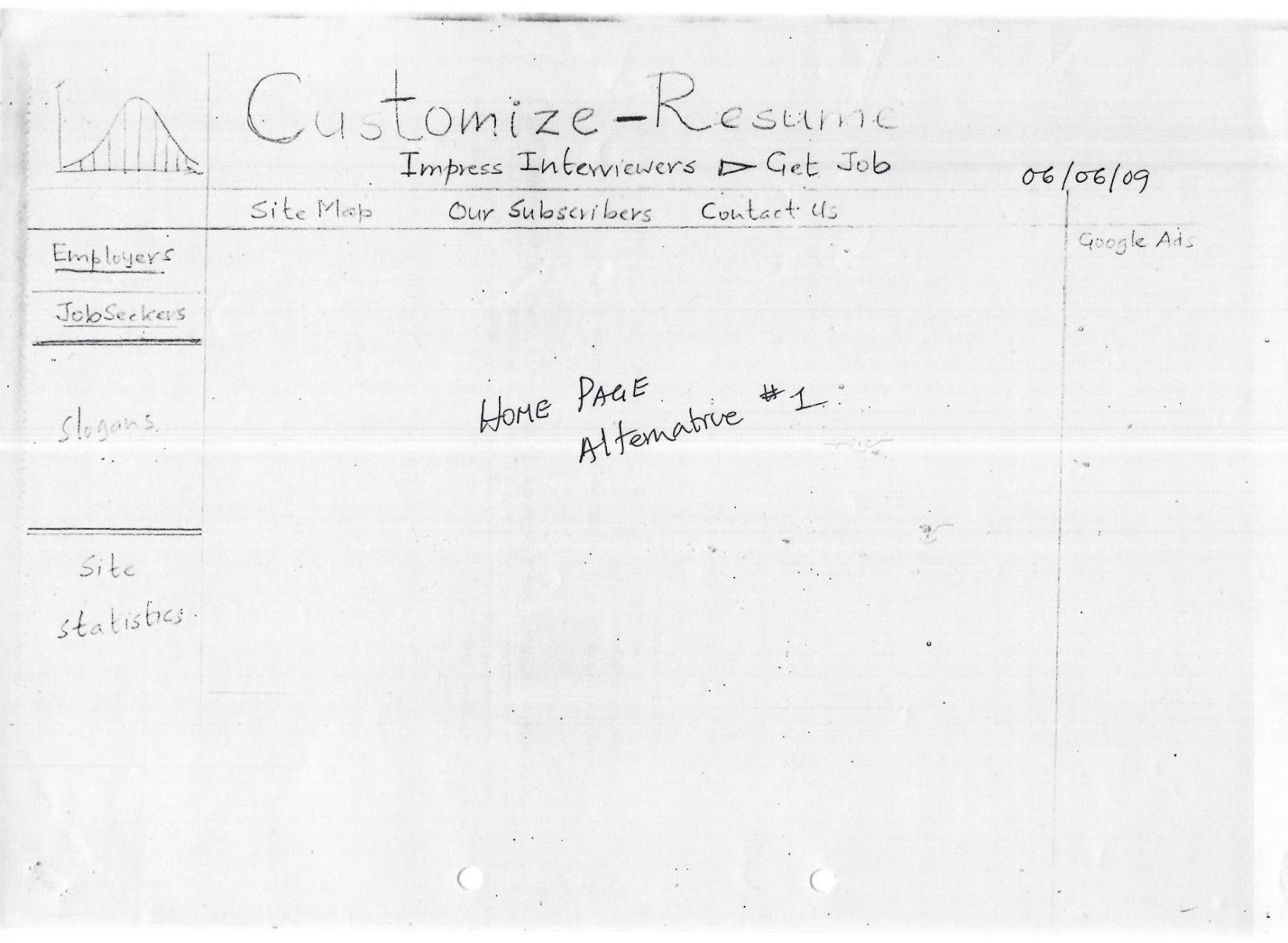


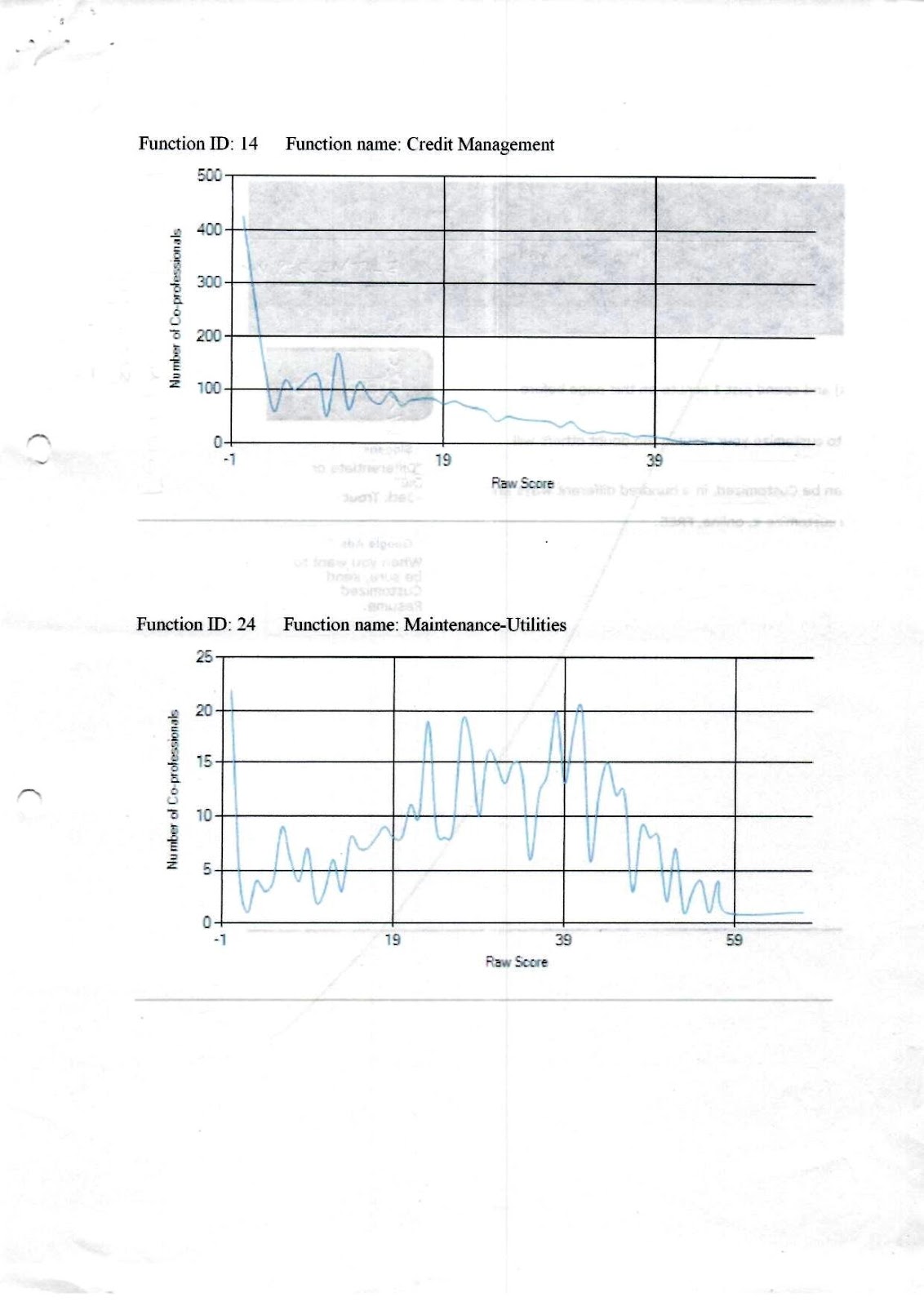


No comments:
Post a Comment