Integrated Call Centers in...
EXPRESS COMPUTER AUGUST 21, 2000
Call-center automation have been
fiercely focused, designed to improve the statistics of center performance by
driving the costs down with the assumption that such enhancements will rub off
on the patient. The call center of tomorrow will turn that process upside down
by leveraging the immense data capabilities of the Web and the Internet.
THE INTEGRATED CALL CENTER
APPROACH
The call center of the future
will not be based solely on "Calls" and is unlikely to be
"text" based. It must therefore, also be enabled by advanced personal
communication provided by the "Net and not driven by ongoing demand for
better services. Instead of just adding new technology, it is like listening to
the radio-soon it become more like interactive television. Live, human-to-human
interaction will persist, but for the first time, all materials have developed.
Towards this, Automated Systems (IVRs) make transactions more convenient by
creating self-services, freeing human bandwidth to interacting with patients.
There are now three broad media
available for patient services: Phone, Text and Web. The Internet and
Web have redefined the meaning of remote conversation. Remote Communications
can now have many of the attributes of face-to-face communication, with
accuracy and good manners and at the same time. In other cases, the internet
has added completely new types of communication like e-mail, text, video and
interactive documents to occur in the convenience of the participants rather
than in real-time.
ELECTRONIC MAIL
Many call centers are already
using e-mail to communicate with patient and prospects. While e-mail is similar
to text or voice messaging, it offers a number of advantages:
- Cost savings e-mail can be sent worldwide for the
cost of a local phone call or less.
- Efficient data storage and retrieval - since e-mail
is agnostic, it is easily recorded with a patient's contact history.
- Enterprise e-mail can be the back-end for a call
center agent's desktop.
- Multimedia messaging is possible to attach files to
e-mail messages and integrate e-mail with other media.
AUTOMATED RESPONSE
Interactive voice response (IVR)
technology has proven its value in call centers for many years. The type of
information that call centers make available over the phone through IVR systems
can also be made available through the Web, but the real innovation is on the
Web have focused on allowing information publishers to offer more interactive,
customized, and secure information rather than just information with highly
sensitive data, including many financial institutions, are allowing their
customers to access and update information over the Internet.
CALL BACK
Imagine a patient exploring the
Web and learning about something new. At some point, a patient will want to
speak with a trained agent. Many call centers are already using systems that
allow their customers to "click" for Automatic Call Distribution
(ACD) and predictive dialing instead. When someone browsing a website wants
to speak with an agent, they can click a button displayed on the site. The
prospect then enters his phone number and it is sent over the internet to a
call center predictive dialing system and soon the prospect is speaking with an
agent.
MEDIA BLENDING
The term media blending refers to
the ability of a call center agent to interact with a prospect both over the
phone and the internet at the same time. Agents can view graphics, information,
such as graphs or diagrams, while speaking with the prospect over the phone.
Media blending operations allow a call center agent to use ALL information
gathered in the prospect's Web browser.
SCREEN POPS
Another example of a powerful
call center application is "Internet 'screen pop'". Call center
managers are already familiar with the concept of "predictive-dialing
screen pop" which automatically brings up the calling party's information
on the computer screen at the same time as the phone rings. This
"Internet" screen pop is delivered by a "screen pop" on the
agent's computer screen and allows them to view many large organizations often
have patient service agents located in a number of places around the world.
These agents routinely give inbound calls to specific agents based on call
loads, caller location, etc. Using the Internet, patient history records can be
retrieved from a central computer screen at the same time the phone call is
being routed.
INTERNET FAX
Today, fax messages are sent via
the phone network and calls are billed per minute. There are many organizations
that are attempting to modernize it. What is revolutionary is the capability to
deliver fax messages Internationally without incurring long distance telephone
charges.
INTERNET TELEPHONY
Internet telephony provides a
major cost saving, allowing agents to use some of the technology that allows
callers to use conventional telephones to place calls that are routed across
the Internet. Call centers are a logical place for applications that provide an
interface to Internet telephony. A second local server application provides the
interface to the traditional telephone, but all of the calls placed are routed
using the third-party. This technology can be used by call centers to allow
call center agents to accept or initiate Internet telephony calls for customer
service.
FOUR WAYS TO SUCCESS
The Current solution side leaps
into the existing service infrastructure, allowing your organization to deliver
world-class service with emerging technologies leveraging in-place systems as
illustrated.
1. Multiple Points of Access:
Phone, E-mail and Web sites should be treated as a patient can initiate a
conversation via email, move to the Web for more information and discussion and
ultimately conclude the conversation with a personalized Service. Many
organizations gather patient data. But to truly effective this data must be
translated into a consistent "look&feel" to make it easier for
the agent to use and to provide updates.
3. Self-Service
Self-service will become more common than assisted service. Patients should be
given access to a managed "enhanced" containing the information they
need and the tools with which to find and use the information. These tools
include inventory service agents, asking questions and using the answers. A
safety net of assisted service should always be available.
4. Funds The new Call
center will be proactive, anticipating patient problems or needs and
"pushing" the information to patients via email or the Web.
CONCLUSION
While organizations could take
advantage of significant cost savings, what matters more would be the focus on
improved patient service and satisfaction. There's no doubt that automated
service will be the path that businesses with vision will take.
MODULE 2 - IMPLEMENTATION
SCHEDULE
|
FEATURE / FUNCTIONALITY |
PHASE |
|||
|
1 |
2 |
3 |
4 |
|
|
End Oct '99 |
End Nov '99 |
End Dec '99 |
End Jan 2000 |
|
|
Activity Chart |
||||
|
Consolidation statement of
financial to Client |
||||
|
Consolidation statement of
financial to Candidate |
||||
|
Auto Job Search |
||||
|
Firing System - Not part of
Module-II |
||||
|
Corporate Database - decided to
drop from Website |
||||
|
Report: - Brain Storm -
Off-line |
||||
|
- Job-cost (Consultant's
time-booking) |
||||
(The rest of the table rows
are blank)
CMT PJP 6-9-99 Module 2 -
Implementation Schedule
By now, you must have gone thru
Module 2 Original File. If so, please return to Cyril today.
On Saturday, I also gave you my
Original folders ( #5-6-7-3-4) for study. Please go thru these - then discuss
with all the Consultants.
As mentioned to you / Cyril, we
should not aim/target to implement all the features of Module 2 "at One
go". That would unnecessarily stretch the time-frames.
Idea is not to aim for
perfection. Idea should be get on with few features at a time, in small doses,
but in quick succession. This will also enable us to give feedback to Cyril.
So, what we need to do is to look
at all the features/functionalities that we want - then prioritise these
- the most important at the top.
I enclose a form in which you
could do this exercise. By making enough copies of this form, you - and maybe
each Consultant - could independently enter the "priorities" - as
he/she perceives.
Each Consultant will enter the
"priorities" from his/her needs/past experience. While prioritising,
they must ask:
- What will help me speed-up the order
execution process?
- On what activity am I spending most of my time?
- What information/data takes me longest to
retrieve?
When everyone (including yourself
& Nimit) have entered your priorities independently, hold a marathon
meeting (not later than 9th Sept) & debate to reach a CONSENSUS
which we should handover to Cyril latest by Coming Saturday (11th).
Rgds (Signature)
CC: Nimit CC: Cyril
CYRIL 26-5-99. "POP-UP"
SCREENS
One of the important features of
our ORDER EXECUTION MODULE is the pop-up screens.
Idea is that whenever a Member
(candidate) OR a Client (company) phones, anyone within our Organisation
(usually a Consultant) should be able to see/view on his/her PC screen, a
complete
JANAM KUNDLI
of that Candidate or that Client.
In the enclosed chart (POP-UP
MENU), I have tried to list a set of FILES/DOCUMENTS (about a client
or a candidate) that a Consultant might want to "view" on his screen WHILE
he is talking on the phone with that person.
I enclose some literature of
"SMARTSET" software from SIEMENS which claims to be
able to do this trick (costs Rs. 18,500) and will work only on SIEMENS
own ISDN compatible EPABX - Model Hicom 118E - costing another Rs. 3.0 Lakhs!
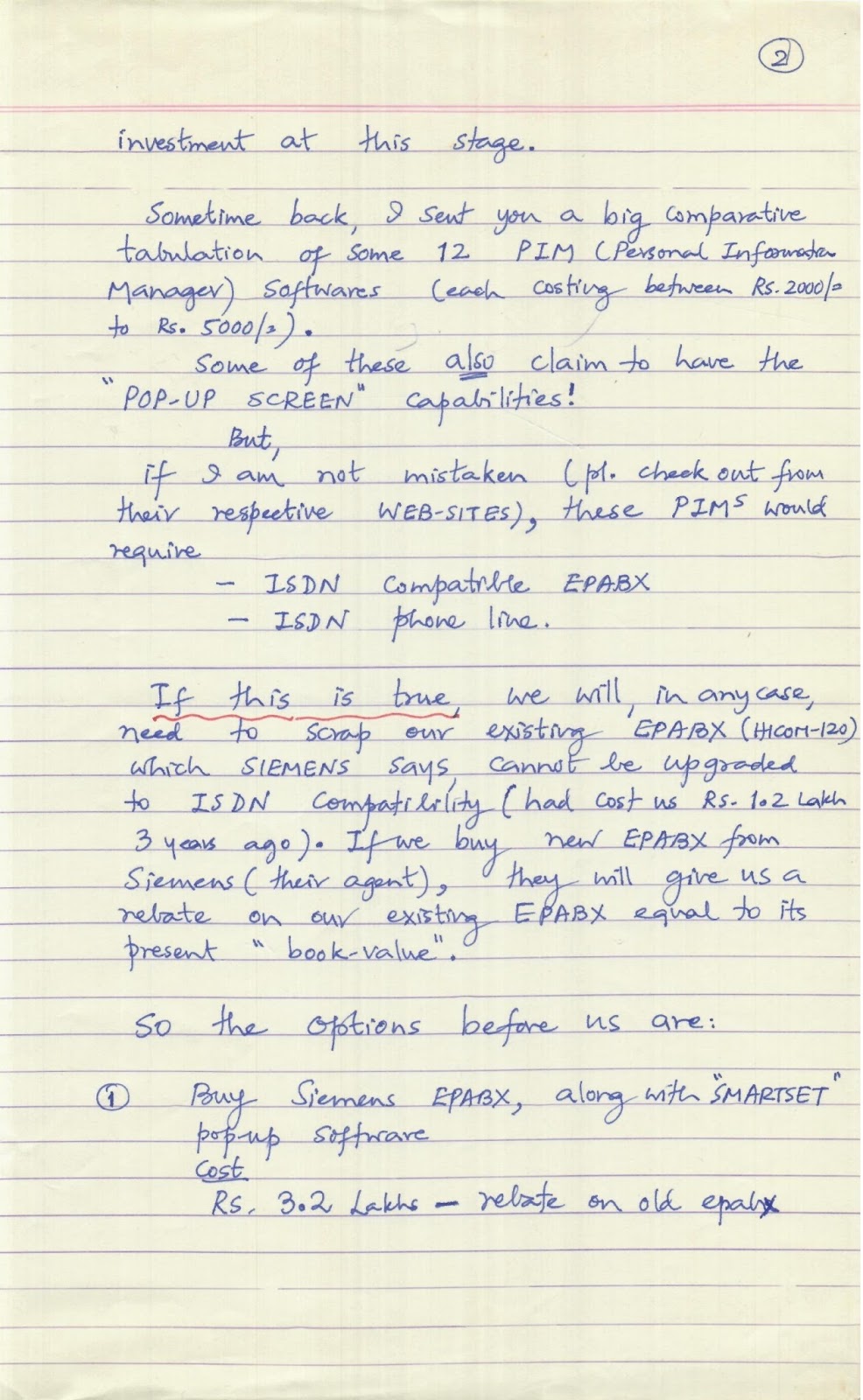
I am sure, we CANNOT
afford this
investment at this stage.
Sometime back, I sent you a big
comparative tabulation of some 12 PIM (Personal Information Manager)
Softwares (each costing between Rs. 2000/- to Rs. 5000/-). Some of
these also claim to have the "POP-UP SCREEN" capabilities!
But, If I am not mistaken (pls.
check out from their respective WEB-SITES), these PIMs would require
- ISDN Compatible EPABX
- ISDN phone line.
If this is true, we will, in any
case, need to scrap our existing EPABX (Hicom-120) which SIEMENS
says cannot be upgraded to ISDN Compatibility (had cost us Rs. 1.2 Lakh
3 years ago). If we buy new EPABX from Siemens (their agent), they will give us
a rebate on our existing EPABX equal to its present "book-value".
So the options before us are:
- Buy Siemens EPABX, along with "SMARTSET"
pop-up software. Cost: Rs. 3.2 Lakhs - rebate on old epabx
(2) Buy some other make, ISDN
Compatible EPABX and install one of the cheap PIM Software,
downloaded from web.
Cost: ______________________ ?
ENKAY-NITSUKO sent an offer for Rs.
6 Lakhs! but, I am sure some cheaper ISDN compatible EPABX must be
available in the market, we have to investigate.
Of course, if you can discover,
thru your research, that there exists some POP-UP Software, that works
on NON-ISDN (analog) epabx, that would be Simply Wonderful!
OR we, simply, do NOT
bother to do things automatically for a while.
eg: When tele-operator transfers
the phone-call to a consultant, he/she, simply uses her keyboard/mouse to open
any file/document listed against the NAME / PHONE NO. of that
Candidate/Client.
Could you please help me decide?
Rgds (Signature)
|
"POP-UP MENU" |
26-5-99. |
|
INDIVIDUAL CALLERS |
|
|
An Associate |
Any Company |
|
Documents from other PC
(Intranet?) Programs that can be assigned to these callers |
|
|
Assoc. Queries |
HELP DESK |
|
-"CLIENT QUERIES" |
|
|
- List/Model |
|
|
Answers |
|
|
- Std - Terms |
|
|
- E-Mails |
|
|
(Sent/Received) |
|
|
- Mailers" Sent |
|
|
- Client Queries/FAQ (Model
Answers) |
|
|
- Past Inquiry/Shopping Basket
History |
|
|
- All the Resumes Sent Sofar
(EPS) |
|
|
- "Proposals Sent"
History |
|
|
- Online Headhunt History |
|
|
- Jobs Posted on our Site |
|
|
- Normal Jobs Uploaded by US |
|
|
- All Executives appointed so
far |
|
|
- Order Execution Status (Module
2) |
|
|
- (Each assignment - WISE) |
|
|
- E-Mails/Voice Calls
(Sent/Received) |
|
|
- Financial Transaction History |
|
|
- (Invoices/Outstandings) |
|
|
- Each Assignment WISE |
|
SIEMENS Smartset PC-supported
telephony
Connecting the PC and telephone
adds new quality dimensions to people's workstations.
To ensure optimum contact with
customers there is a strong demand in many companies for a system that
instantly recognizes and registers all incoming and outgoing calls.
In particular, workstations with
a high volume of telephone traffic, such as in telephone marketing, sales and
dispatch departments, as well as in departments for undertaking service and
secretaries' offices, need a clearly arranged user interface that can be
quickly installed and operated, with a high degree of comfort.
As the software for this Smartset
offers a convenient PC telephone directory program under the Windows interface,
the user benefits from easy access to telephone numbers and work processes to
be speeded up, thus saving costs. A high level of user acceptance is ensured
due to a small Smartset that is clipped to the system's open voice phones.
Smartset's major functions are:
- Telephone directory with search criteria
- Dialing from the PC telephone directory
- Automatic callup of PC telephone application (DDE)
- List of received calls
- List of calls still to be made
- Calling party identification via address database
- Menu tools that can be set in different languages
System requirements
- PC
- at least 386 processor
- COM 1-4 M 3x/i Interface
- Windows or higher
- Windows 95
- Windows NT or higher
- Communication
- Hicom or higher
- Hicom or higher
- Hicom or higher
- Hicom
- Terminals
- specific system telephony with Smartset client
license
- Product software Version
Smartset is a product from: O-N-E
Software, Deutschland.
Issued by Information and
Communication Networks Group Hofmannstrasse 51, Forchheim. Siemens
Aktiengesellschaft Data Sheet
Features
Telephone directory with
search criteria With Smartset a separate telephone directory can be created
for business contacts. In addition to the standard entries there can be
maintained several, e.g. for PC networks, and so on. Individual search fields
allow all stored telephone entries to be found and switched over automatically.
The currently open file is always shown at the top of the list.
Individual entries such as name,
company and numbers, and additional information such as memo texts, comments or
names are stored in the telephone directory. The entries are stored in a
database format. Import and export functions from other address files can
easily be implemented.
The displayed entry can be
printed out in the telephone directory (up to the memo field).
Dialing from the PC telephone
directory To dial a number it is also possible to search for various
criteria (name, company, etc.) in the complete database using address book
entries. For a name search it is sufficient to enter a letter of the alphabet
to start the search.
The selected entry is then called
directly on the screen by clicking with the mouse. When the number is busy, or
a number is not entered, the call can be entered in the main mask simply by
keying it in on the keyboard.
Automatic callup of a PC
file/application With Smartset it is possible to carry out incoming calls
an announcement via a sound card in the PC and an adjacent Smartset application
using a headset or acoustic adapter. Also, an allowance is made for individual
entries for individual members.
Documents from other PC programs
can be assigned on an individual caller basis to callers of any of the 28
caller types. For a new call, Smartset can transfer the caller's telephone
number and name to the designated PC program. When the program is then started,
the corresponding document is automatically opened. This can be assigned to a
customer or a sales manager.
(Handwritten note in red ink
over the text: "Documents... designated PC program." starts here)
Documents from other PC programs can be assigned on an individual caller
basis to callers of any of the 28 caller types. For a new call, Smartset can
automatically transfer the calling party's telephone number and name to the
designated PC program. When the program is then started, the corresponding
document is automatically opened. This can be assigned to a customer or a sales
manager. (Handwritten note in red ink over the text: "...customer
or a sales manager." ends here)
(Handwritten note in red ink
below the image:) I suppose this means that, whenever someone (to begin
with, a "client or a "member-candidate") phones & the
recipient transfers the call to a particular CONSULTANT, "Smartset"
software will display/pop-up, all the FILES/DOCUMENTS (about that
company/person) which are stored in our Internet server against the name of
that person/against that telephone no.
List of received calls
When the Smartset application has been activated in the PC, incoming calls
(ISDN, MODN, mobile, etc.) are recorded in the list of received calls together
with the number, time and date of day. The calls are stored in a database
format, free memory space in the PC. Callbacks are initiated simply by clicking
with the mouse. The telephone number can be stored as a text file for logging
purposes.
List of calls still to be made
Call partners can still need to be called and are entered manually or can be
transferred to the call list. The entries appear in a menu window, which can be
printed from here by clicking with the mouse.
Calling party identification
via address database When the function "Show received call" has
been activated, the phone rings and the program indicates Smartset uses the
incoming number (ISDN, mobile, etc.) for a search in the address database
(address book entry) in the database. If an entry is found, other stored
information is also displayed, e.g. company name, and department. The data are
also stored centrally in a server for a PC network.
For incoming calls Smartset not
only searches in the address database, but in additional number fields (mobile,
private number, etc.) and in the centrally administered number fields can be
carried out. If a value between 1 and 4 has been set when an entry is stored in
the positions field, for incoming calls Smartset searches through the commonly
administered address database or the telephone directory from there also. The
selection whether an entry search is performed via the address database or via
the telephone directory is the length of the user's own extension.
Smartset for tax consultants
Smartset also offers a version for tax consultants that supports all functions
for PC-supported telephony and, in addition, allows tax consultants to
individualize clients via an employee number. Client numbers can be managed in
a text file.
An optional Extra module allows
DATEV's existing "Central master database" (DMD) to be traced in.
Database linking Smartset
provides an integrated DDE interface. The interface allows other software to be
opened via the DDE capability. The supplied sample module for Microsoft Word
and Excel is available. This quick dial module allows a "mark",
"text", "search for an entry" and "Trace DMD
database" as well.
Smartset can be programmed by
programmers themselves.
File import modules
Additional module for importing and exporting customer data for the Smartset
telephone directory with the ASCII and DBASE/DMD formats.
CYRIL
MASTER - SCHEDULE FOR BUSINESS
PROCESS RE-ENGINEERING.
Let us discuss this at the
earliest.
|
SRL No |
May '99 |
June |
July |
Aug |
Sept |
Oct |
Nov |
Dec |
Jan 2000 |
Feb |
March |
April |
|
|
MARKETING |
|||||||||||||
|
- Install "MAIL KING" |
$\checkmark$ |
||||||||||||
|
- H/w to speed-up Mailing (1000
email per day) |
$\checkmark$ |
||||||||||||
|
- Proactive Marketing |
$\checkmark$ |
||||||||||||
|
SALES |
|||||||||||||
|
- Install TALISMA? (Email
Management & Customer Relation Management soft.) |
$\checkmark$ |
||||||||||||
|
ORDER EXECUTION Module
#2 |
$\leftrightarrow$ |
$\leftrightarrow$ |
$\leftrightarrow$ |
||||||||||
|
WIN NT SERVER |
$\leftrightarrow$ |
$\leftrightarrow$ |
|||||||||||
|
DATABASE CREATION |
|||||||||||||
|
Integration of MODULE #1
with |
$\leftrightarrow$ |
$\leftrightarrow$ |
$\leftrightarrow$ |
||||||||||
|
- Ezze Post (Collect Job
Posting from Internet) |
|||||||||||||
|
- Resume Miner (Collect
Resumes) $\rightarrow$ www.ezres.com |
|||||||||||||
|
- Ezze Job Finder (?) |
|||||||||||||
|
- Audio Mining (Speech
$\rightarrow$ Text $\rightarrow$ Database of Phoned-in Resumes) |
|||||||||||||
|
24-5-99 |
SHOPPING BASKET SUMMARY
STATEMENT - ORDER EXECUTION MODULE.
|
Date of Shopping Basket |
Sender's No. |
Sender's Name |
Executive Designation |
Company Name |
Qty |
Job Designation |
Job Location |
Posting Above Location |
Responsibilities |
PEN OF SHORTLISTED
CANDIDATES. |
Our Terms |
Sent (Date) |
Sent By |
If resulted in order (PO
No./Date) |
Consultant Responsible for
Execution |
Remarks |
|
$\downarrow$ Such a unique
number IS a MUST. |
CYRIL As per record
maintained by Sajida, we have received from our site, "Shopping
Baskets" as follows: Feb '99 $\rightarrow$ 25 March
$\rightarrow$ 16 April $\rightarrow$ 29 Upto 25th May
$\rightarrow$ 20 We need a Summary, as shown on this page, to get
automatically compiled and displayed on our INTRANET Server which
could be viewed by all consultants. Consultants should be able to enter last
5 columns. This would help us to methodically & aggressively follow up
each "Shopping Basket" until it gets converted "into an Purchase
Order". This is a URGENT Requirement. |
$\downarrow$ This No. IS a
MUST. |
||||||||||||||
(Signature)
25/5/99
CC: Nimit
CMT-Sajida? Any suggestion?
ORDER EXECUTION MODULE
SYSTEM REQUIREMENT
INDEX
|
Subject/Topic of Note |
Date |
|
MIS - Daily/Weekly/Monthly
Statistics |
3-9-93 |
|
3 Dimensions
(Number/Timeframe/Reward) |
17-9-93 |
|
Interview Feedback from Clients |
27-4-96 |
|
Order Backlog/Pending
Assignment Analysis |
29-11-98 |
|
10 standard statements |
11-7-93 |
|
Interview Follow-Up |
25-6-93 |
|
31-3-94 |
|
|
7-5-97 |
|
|
27-5-97 |
|
|
Follow Up |
30-3-94 |
|
- with Our Own Staff |
" |
|
- with Candidates |
29-3-94 |
|
- with Clients |
|
|
Chasing Events & Activities
(To send what-when-whom) |
30-3-94 |
|
18 Screens (Pop-Up ?) of
PAPERLESS OFFICE |
12-11-94 |
|
26-11-94 |
|
|
Order Execution System - MASTER
CHART |
2-9-93 |
|
1-2-94 |
|
|
HELP DESK & QUERIES
(clients/candidates/Associates) |
23-4-94 |
|
16-11-94 |
Cyril
2/5/99
Sub: Order Execution Module
The enclosed note (E-MAIL)
is 5 years old (23-4-94).
At that time, internet was
beyond horizon. So, it is not surprising that, in the enclosed note, I have
talked about the concept of a HELP-DESK with several technical &
commercial support staff
- taking "Orders" over telephone
- answering "Queries" "
The concept of a Client,
- placing "order" thru internet
- tracking/monitoring progress of his
"order" on our website
Simply did not exist!
But, in 1999, things are Vastly
different.
Although "Help-Desks"
do exist (even on websites), it is only a matter of time, before these become OBSOLETE.
More & more Companies are
using Internet (their website) as a CENTRE PIECE/ANCHOR
around which, all their business-processes are centred.
The current scenario is somewhat
like:
Internal Business Processes
e.g.
- Order Execution $\rightarrow$ Intranet
- Admin
- Sales
- Accts
- HR
- R&D
Supply-chain
(Vendors/Contractors/Suppliers) $\rightarrow$ Extranet
- (Inventory Mgmt.)
Customers/Clients
$\rightarrow$ Internet
- Company Information/Product Info.
- Help Desk/Tech. Support
- Order placement/Credit Card verification.
But I feel, for most Companies
(at least in U.S.A./Europe/Japan), the barriers would fall and there would be a
SINGLE INTERFACE for
- Employees
- Suppliers
- Customers
That SINGLE interface
would be a company's WEBSITE!
This has already happened with a
few large American Companies. Examples of these could be found in following
books:
- Web-Pages that Suck (Sent to you)
- Webonomics $\left.\begin{array}{r}\text {
with } \\ \text { Sajida }\end{array}\right\}$
- Business @ Speed of Thought (Bill Gates)
- Direct from DELL. (I am still reading)
If we had implemented HELP-DESK
5 years ago, that would have been fine. It might have even helped our staff
to get used to "doing business over telephone".
But, having "Waited",
I feel, it would be wise to simply "By-Pass" that stage of
"evolution" altogether and straightaway jump to the concept of
FULLY INTERACTIVE SINGLE INTERFACE (WEBSITE).
We may still develop our ORDER
EXECUTION SYSTEM (MODULE #2) around our INTRANET &
thoroughly
test it out before MERGING
with the INTERNET.
This will help us to "debug"
our internal business processes before exposing these (processes) to the public-at-large.
Because,
If these (processes) do NOT
perform 100% correctly/accurately on our website, it might get adverse reaction
- even ridicule - and clients may NEVER RETURN!
Eg.
What is happening to our
MEMBERSHIP SERVICES ( $\odot$ Edit / Auto Job Search / Job Mail Robot ) for the
last 8 months!!
But, our "goal" has to
be clear right now.
And that is,
"Merger of Intranet with
Internet".
Assuming that
- Implementation of Module #1 takes 2 months
(May/June)
- Development of Module #2 (Order Execution)
covering features in the enclosed notes, takes 3 months (May/June/July)
- Testing of Module #2 takes 2 months (Aug/Sept)
- Development of NEW WEBSITE (NT based) takes 2
months (Oct/Nov)
- Merger of Module #2 into NEW NT Based
Website takes 3 months (Dec/Jan/Feb 2000)
We are talking of a PROJECT
TIME FRAME of 12 months.
If we manage this Schedule (and
do you see any reason, why we cannot ?), at the end of this
12 month period, we should
be ahead of
- all Indian jobsites
- most of the World's jobsites
By March 2000, I also
expect that, in India,
- Internet subscriber base would have grown
substantially
- many ISPs would be operational
- "Internet - over - cable" would
have become a reality (IN Cable / SITI Cable & a Atul Punj
Delhi Party which expects to launch (Punj Lloyd) this by June 99).
If this happens, millions of home TVs will be able to "access"
internet (Hinduja (IN), alone have 2.3 million cable TV connections in
12 cities).
- hundreds of Cyber-Cafes would have come up.
- Internet Connection Charges would have dropped
drastically (each "late-comer" ISP would have to drop prices
to be able to enter the fray). (DISHNET offering Rs. 1.8/hour in
Pune/Chennai!).
- E-Commerce would have become a
"little" easier (Yesterday, HDFC announced Payment-Gateway
- 14/5/2000)
In the books mentioned earlier, I
have underlined/marked-out, sentences/paras/pages, which I would request
you to read, before you start working on Module #2.
Unless, we have the GRAND
PICTURE in front of us, we would end-up on the periphery!
I subscribe to Jack Welch's (GE)
business philosophy, viz:
"If $\odot$ in any business,
you cannot be either #1 or #2, get out of it!"
To implement this project, I am
ready to commit
- required funds
- my own time
- 3rd Party Organisational Support.
I am sending this note to you
with a request to commit
- your own personal time & attention
- a dedicated team of professionals
- time-frame (with bonus/penalty clauses)
How Soon?
Regards
(Signature)
2/5/99