Scan_0001.jpg
Title: Post Job (for Job Fair
Online Interviews Only)
Date: 22-10-2012
Dear Employer:
- For timebeing, JobFair is only open to Fresh
Graduates. Hence, in the form below, post only those jobs where
"Experience Requirement" does not exceed 2 years.
Form Layout
|
Candidate Requirement |
Job Details |
Employer Details |
|
Edu. Level: [Select] |
Job Title/Position:
[______] |
Same as in conventional
"Post Jobs", except: |
|
Degree/Diploma: [Select] |
Category: ITO / Non-ITO |
• No feature to hide Company
Name, Email, Fax, Address. |
|
Specialization: [Select] |
Function/Skill: [Select] |
• Add "Skype ID" of
Interviewer (maybe). |
|
Gender: Male / Female |
Additional Keywords:
[______] |
Do hide while displaying: |
|
Experience Required: NIL
/ 1 Yr / 2 Yr |
Posting Country/Cities:
[Select] |
• Contact Person Name, Email
ID, Mobile No. (to ensure candidates do not harass!) |
Interview Settings
- For online interviewing: Select your mode
(conveyed to applicants).
- Priority Modes: 1st, 2nd, 3rd Preference
(Skype Video, Google Talk, Mobile Phone).
- Job Type: Outdoor / Indoor
- Nature: Permanent / Temporary
- Work Hours: Full Time / Part Time
- Dates: Date Posted, Last Date for Applying,
Interview (Tentative) Date.
- Timing (IST): [] AM to [] PM.
Scan_0002.jpg
Title: Employer Registration
Site Map / Contact Us / FAQ
Dear Employer:
- All of our services to you are absolutely FREE.
- No subscription, no limit to the no. of jobs or
online interviews.
- Multiple HR Managers/Recruiters can use the same
User ID/Password simultaneously.
Sidebar Menu
- Action Pages: Register, Post Job, Live Jobs
Summary, Create Interview Schedule, Employer Interview Calendar, Employer
Interview Console, Post Job Offer Letter, Summary of Job Offers made, Job
Offer Status (Position Wise).
- Occasional Use Pages: Offer Letter Template,
Blacklisting of Candidates, Raise the Bar, Who is Interviewing?
- Reference Pages: Process Comparison, All
Jobs Posted So Far, Closed Jobs Summary, Process Flow Chart.
Registration Form Fields
- A. Company Information: (Replace Mobile No.
by Landline No.)
- B. Additional Information: (Change to
MANDATORY)
- C. Upload Company Video/PPT: [Optional]
- D. Online Interview Tools (MANDATORY): Skype
ID, IM ID, Mobile Phone Nos.
- E. CAPTCHA
- F. Checkbox: I have read all the Terms &
Conditions and agree to them.
- [Register Button]
Scan_0003.jpg
Title: Live Jobs Summary
Dear Employer:
Here is a list of jobs where you
still have to conduct interviews—even though you may have fixed the interviews
(i.e., Created Interview Schedule) for some. These are jobs where you are no
longer accepting resumes (Closing Date is over).
Data Table
- Fields: Srl No, Job ID, Position, Posting
Date (Latest on Top), Resume Acceptance Closing Date, Resumes received
till Closing Date, Create Interview Schedule (Checkbox), Edit Interview
Schedule (Checkbox), No. of Resumes accepted for Interview (Auto-filled).
Scan_0004.jpg
Title: Resumes Received (STEP
#1)
Tab: Create Interview Schedule
Dear Employer:
You get to see/view this page
when you tick the following columns on "LIVE JOBS SUMMARY" page for
any particular Job ID: "Create Interview Schedule" or "Edit
Interview Schedule".
- Resumes are captured at a single place called
"Vacancy-wise Resume Holder."
- No flooding or searching through your mailbox.
Status Indicators
- Rating Under Process: Ticked when you click
Job ID in first column.
- Rating Done: Ticked when you click SUBMIT in
"Resume Rating".
- Int. Date Alloted: Ticked when you click OK
in "Interview Calendar".
Table Example
|
Job ID |
Position / Vacancy |
Resumes Received |
Rating Under Process |
Rating Done |
Int. Date Alloted |
|
2397 |
Engineer Trainee |
85 |
[Check] |
[Check] |
[Check] |
|
5934 |
Data Entry Operator |
256 |
Scan_0005.jpg
Title: Resume Rating (STEP #2)
Dear Employer:
Upon arrival, the first 5 columns
are pre-filled. Open/read resumes by clicking on the PEN icon. Rate them
A/B/C/R (Excellent, Good, Fair, Reject) and select the checkbox if shortlisting
for interview.
Job ID Selected for Rating:
2397 | Position: Engineer Trainee
Rating Table
- External Factors: % Marks, Year, Peer
Rating.
- Internal Factors: If already blacklisted,
Rejected earlier (e.g., Job ID 2346).
- Resume Rated As: A (Exc), B (Good), C
(Fair), R (Reject).
- Select: [Checkbox] if shortlist for
Interview.
- Total: Auto-fill summary of candidates
shortlisted from each category.
- [SUBMIT Button]
Scan_0006.jpg
Title: Interview Date (STEP
#3)
Dear Employer:
Select a free date from the
calendar by clicking/pressing, then drag and drop it into the "Interview
Date Allotted" column. Click [OK] to confirm. The date will then disappear
from the calendar to avoid double-booking.
Calendar View (Oct/Nov 2012)
- X Indicates date is already booked.
- Circled Dates: Oct 27, Nov 24.
Confirmation Table
|
Srl |
Job ID |
Position / Vacancy |
Shortlisted (A,B,C,R) |
Interview Date Allotted |
Click to Confirm |
|
1 |
2397 |
Engineer Trainee |
[Summary] |
Oct 27 |
[OK] |
|
2 |
5934 |
Data Entry Operator |
[Summary] |
Nov 24 |
[OK] |
Scan_0007.jpg
Title: Generate Interview
Schedule (STEP #4)
Dear Employer:
Create "Virtual Interview
Cabins," each with its own independent interviewer. Fill in Section A,
click [FREEZE], then click [Generate Schedule & Intimate Candidates].
Section A: Employer to Fill
|
Interview Cabin Reqd |
Cabin 1 |
Cabin 2 |
Cabin 3 |
|
No. of Candidates |
10 (Mostly A) |
20 (Mostly B) |
26 (Mostly C) |
|
Time/Candidate |
30 min |
20 min |
10 min |
|
Total Time |
300 min |
400 min |
260 min |
|
Start Time |
8:00 AM |
9:00 AM |
10:00 AM |
Auto-Generated Schedule
Section
- Shows list of PEN (Candidate IDs) and specific
times (e.g., 8:00, 8:30, 9:00).
- Buttons: [Look OK / Freeze], [Edit], [Generate
Schedule and intimate candidates].
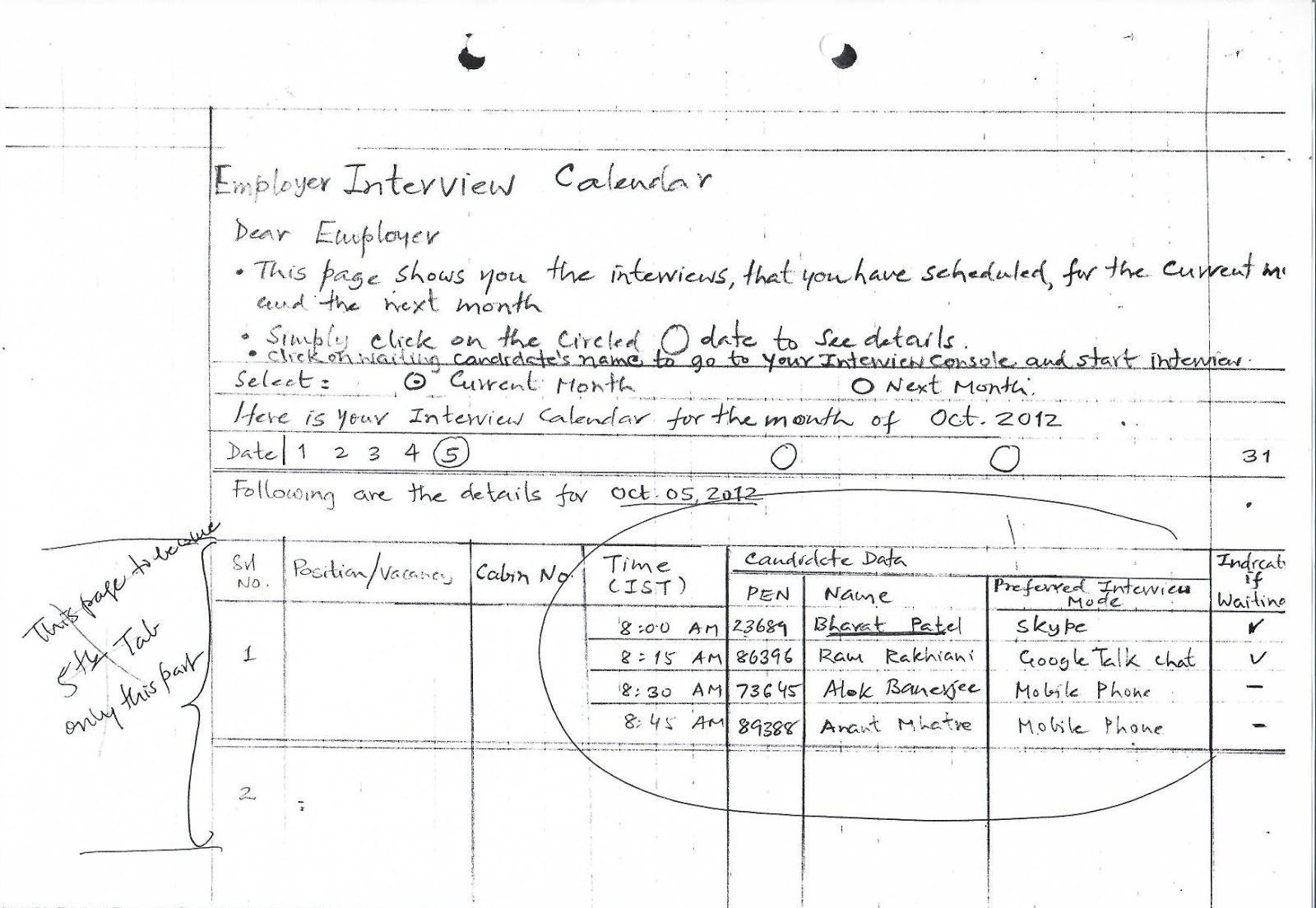
Scan_0008.jpg
Title: Employer Interview
Calendar
Dear Employer:
- Shows scheduled interviews for current and next
month.
- Click on a circled date to see details.
- Click on a waiting candidate's name to start the
interview console.
Details for Oct 05, 2012:
| Srl | Position | Cabin No |
Time (IST) | Candidate Name | Mode | Waiting? |
| :--- | :--- | :--- | :--- |
:--- | :--- | :--- |
| 1 | [Title] | 1 | 8:00 AM |
Bharat Patel | Skype | [Yes] |
| | | | 8:15 AM | Ram Rakhiani |
Google Talk | [Yes] |
| | | | 8:30 AM | Alok Banerjee |
Mobile | - |
Scan_0009.jpg
Title: Employer Interview
Console
Interface Header:
- Job ID, Position Name, Candidate being Interviewed.
- Final Decision: Send Offer / Regret / Keep
Hold.
- Interview Rating: Excellent / Good / Fair /
Not Suitable.
Interviewer Feedback Note:
"Even as you are
interviewing... other recruiters are quietly listening... much like a Radio
station... Here is how they have rated you on a scale of 1 to 5."
- No. of Recruiters who eavesdropped: [___]
- Their average rating: [___]
Main Console Area:
- Large area marked "Skype".
- Right Sidebar: Interview Schedule (Venkat
9:00 AM, Patel 9:20 AM, etc.).
- Footer: [View Past Questions], [Save
Interview Log], [SUBMIT], [CLOSE].
Scan_0010.jpg
Title: Note on "Employer
Interview Console" (Page 1/3)
- Clicking on "Candidate Name" will:
- Open resume in a pop-up.
- Invite them via message: "Good
morning/afternoon, [Name], We/I am glad for you to come."
- Fill up "Candidate being interviewed"
field.
- Waiting Room: When a candidate
"arrives," their name turns GREEN.
- Absence: If a candidate is absent, they can
be skipped. The name is pushed to the bottom of the list.
- Peer Review Logic:
- Interviewers will ask tougher questions to impress
"invisible peers."
- Interviewers will anxiously watch their "Ave
Rating Score."
Scan_0011.jpg
Note on "Employer
Interview Console" (Page 2/3)
- If interview takes place thru "chat", I
believe one can "save" the entire log. I don't know whether
"Voice" log can be saved or not. It would be nice if it can.
- I have provided "Save Interview Log"
button. If clicked, it will save entire (typed) log and store it against
that candidate's PEN. Then, we can enable either Interviewer or the
concerned candidate to "access/view" this log at a later date.
Going over such a log, at a later
date, can prove to be a very useful "Learning Tool" — at least for
the candidate. He may share/discuss questions asked and answers he gave, with
his friends.
All candidates do this (exchange)
even today — but, it gets limited by what/how much he "remembers" of
the interview.
- With a facility to "access/view" entire
log, he does not have to depend upon his memory! Feedback from friends
would help him prepare better for the next interview.
- In www.IndiaRecruiter.net, we had a feature called "IIT
- Interactive Interview Tool".
Scan_0012.jpg
Note on "Employer
Interview Console" (Page 3/3)
In this, we had following
features:
- Keywords (function/skill) found in a resume got
highlighted.
- Hovering mouse on any keyword opened a tooltip
reading:
- Consult Wikipedia
- See Interview Questions
- All together, we had compiled an inventory of some
15,000+ Interview Questions in a database.
- If Interviewer clicked on Wikipedia, it would open
page concerning that keyword. That helped Interviewer ask relevant
questions.
- If he clicked "See Interview Questions",
it showed one—or more—questions which contained that keyword. It does
help. But 15,000 was a too low figure, considering what can be asked.
- I believe, we should incorporate this feature in
OnlineJobsFair, at "Employer Interview Console".
- On top of that, Interviewer can see "past
Interview questions asked" by ALL the recruiters, by clicking
"View past Interview log" button.
- But we need to store all past logs of all
past interviewers, for identical/similar "Positions/Vacancy". No
use seeing questions pertaining to (say) "Graduate Eng. Trainee"
when you are interviewing for "Counter Salesman".
Scan_0013.jpg
Job Post / Offer Letter
Dear Recruiter,
- Congratulations for selecting [] [] for
position of [______________].
- Please fill-up following Offer letter and [POST].
It will get posted automatically in this candidate's "Summary of Job
Offers" page, where he will enter his decision (viz: Accept or
Reject). In turn, candidate's decision (Offer accepted or rejected) will
get automatically posted in your "Summary of Job Offers Made"
page.
Candidate Details:
- Name: * PEN:
- Email ID: [_______]
- Mobile No: [_______]
- Date of Interview:
- Position:
[Standard Letter as per
earlier draft created/saved by the employer]
Step 1: [Edit]
$\rightarrow$ Step 2: [Save] $\rightarrow$ Step 3: [Post]
PS: Once you
"Accept" this offer online (in your "My Offer Letters"
page), a final offer email will be sent to you. Please print out this email and
bring it along at the time of joining.
Scan_0014.jpg
Dated: 21-10-2012
Summary Of Job Offers Made
Dear Employer,
This is a 2-step process.
- In first step, in the "Employer Interview
Console", after interviewing a candidate, you record your Final
Decision as (O) Send offer.
- That takes you to "Post Offer Letter"
page, where you edit (if required) "Standard Letter" template,
save it and then click [POST].
When you complete this 2-step
process, following summary gets updated automatically and an email/SMS goes out
to concerned candidate, asking him to look-up his "Job Offers
Received" page and tick [ ] either "Accepted" or "Regretted".
As soon as he does, you will get to know his decision below.
|
SN No |
Interview Date (Reverse
chro) |
Job ID |
Position |
Candidate Name |
Offer Posted Date |
Status: Accepted |
Status: Regretted |
Date Acc. |
|
1 |
Oct 20, 2012 |
1369 |
Grad. Trainee |
A. J. Patel |
Oct 21 |
[x] |
[ ] |
Oct... |
|
2 |
Oct 15, 2012 |
3684 |
Apprentice |
Subodh Mehta |
Oct 18 |
[ ] |
[x] |
Oct... |
Scan_0015.jpg
Dated: 03/11/2012
Job Offers Status - Position
Wise
Dear Employer,
For each position (Job Advt), you
may interview many candidates and may send job offers to a few. Some may accept
and some others may regret. Obvious! You cannot keep track of all these details
manually. Don't worry! Here are all the details at your finger-tip,
continuously and automatically updated. Just click the Job ID!
|
Job ID |
Position |
Advt Date |
Resumes Received |
Interview Date |
View Intvw Log |
|
1234 |
|||||
|
5678 |
[Expanded view for Job ID]
| SN | PEN | Candidate Name |
Interview Rating | Offer Date | Accepted | Reject |
| :--- | :--- | :--- | :--- |
:--- | :--- | :--- |
| | | | | | | |